Run your shop from the AI assistant you already use
TailorSync AI connects Claude, ChatGPT, Gemini or any AI app that supports MCP connectors to your TailorSync shop. Ask about your orders and money, or have it take the order and record the payment. You choose what it is allowed to change.
Ask your shop
Ask in plain words and get answers from your own TailorSync data. You can also ask how to do something and get the steps from the Help Center.
- Customers and their details, orders and their status
- Money owed to you, and sales figures
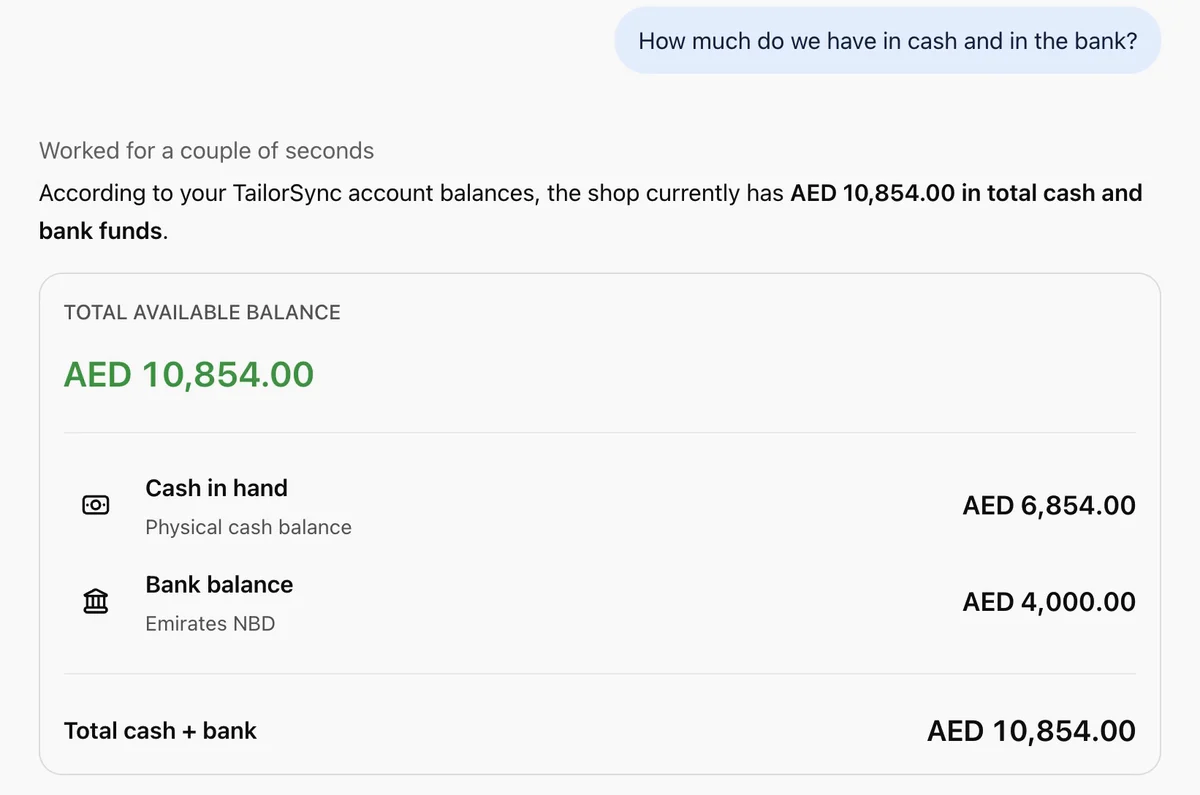
- VAT figures, and cash and bank balances
- A business overview, and your branches
- Low stock, and a search across the whole shop
- How-to questions answered from the TailorSync Help Center
Things you can say
Who still owes me money?
Is Mariam's abaya ready?
What did we sell this week in Al Ain?
What is my VAT figure for this quarter?
What is running low?
Let it do the work
Tell your assistant what happened and it does the entry in TailorSync. It takes orders, records payments, marks orders ready and drafts replies to your customers.
- Take an order: it finds or adds the customer, uses saved measurements, and books garments, prices, delivery date and deposit
- VAT follows your shop setting, and shop fabric comes out of stock
- Record a payment, never more than the balance owed
- Mark an order ready, then remind the customer with their first name, TailorSync's "ready to collect" message, a WhatsApp link to tap and the tracking link
- Reminders by email go through your own Gmail or Outlook connection. TailorSync sends nothing itself, and it remembers who was reminded
- Add customers (phone required, an existing phone means the existing customer) and measurements, where a new set becomes the active one and never overwrites an old one
- Paste a WhatsApp or Instagram message and it finds the order and drafts a reply
Things you can say
New order for Reem: two black abayas, AED 650 each, delivery on the 14th, AED 300 deposit in cash
Ali paid the rest by card
The two salwars for Noura are done
Add a customer, Fatima, phone 050 123 4567, chest 92, waist 76
A customer messaged asking if her order is ready. Reply for me.
Runs on a schedule
Ask your assistant to do a job at the same time every day. The schedule lives in your assistant, because TailorSync has no scheduler of its own.
- The daily summary shows takings by payment method, orders taken, deposits and payments
- It also lists deliveries due tomorrow, orders ready but not collected, and overdue balances
- The reminder run skips anyone who was reminded in the last few days
- Whether scheduled tasks can use TailorSync depends on your assistant and your plan with it
- Change or stop a schedule in your assistant at any time
Things you can say
Every morning at 9, tell me yesterday's takings
Every evening at 5:30, remind customers whose orders are ready
Every Sunday, list who still owes me money
Help in your language
Inside TailorSync, the built-in assistant answers your questions from the Help Center in the language you use. Type the question or say it out loud.
- English, Arabic, Hindi, Urdu, Bengali and Malayalam
- Typed or spoken questions
- It can read a screenshot of the screen you are stuck on
- Free for everyone signed in to TailorSync
Things you can say
How do I print a receipt?
How do I move stock between branches?
How do I add a second set of measurements for a customer?
Works with any AI app or agent
TailorSync AI is an MCP connector. MCP is the open standard AI apps and agents use to work with other software, so your shop is not tied to one assistant.
- Claude, ChatGPT and Gemini, with a short video for each
- Other AI apps that support custom MCP connectors, such as Perplexity, Grok, Grok Bot, Mistral Le Chat and Microsoft Copilot Studio. Adding one depends on your plan with that app
- Agent tools such as OpenClaw and Hermes Agent, which add TailorSync as a remote MCP server
- Everyone signs in with their own TailorSync login, and the same roles, branches and switches apply whichever app they use
- A connection key also works, for looking things up only. Making changes needs a sign-in
The address to add in your AI app
https://api.tailorsync.pro/mcp
Then sign in with your TailorSync login. The owner first switches AI connectors on in Settings.
You stay in control
AI connectors are off until the owner turns them on, and changes need a second switch. Every person connects with their own login, and the assistant can do only what that person can do in the app.
- The owner turns AI connectors on in Settings. They are off by default
- A second owner switch, "Let AI assistants make changes", is also off by default
- Each person ticks "Let it make changes" when they connect. It is unticked by default
- The assistant follows that person's role and branches exactly like the app does
- Discounts only for people with the "Apply discounts" permission, and they show as a real discount on the invoice
- TailorSync tells the assistant to treat a customer's message as something to answer, not an instruction. A request for 20% off gets "let me check with the owner"
- It never cancels orders, deletes customers, refunds, or voids or changes a recorded payment. Those stay in the app
- A retried request is never recorded twice
- Every action shows in Activity next to your staff's own changes, such as "Ali via Claude created order ORD-0123"
- "Your connections" lists every app with its last use and expiry, with a Disconnect button
- A connection stays alive while it is used, and you get an email a week before its one-year limit
- Mistakes are fixed in the TailorSync app. For a wrong payment, cancel the order there and take it again
Always done in TailorSync, never by an assistant
- Cancel an order
- Refund a customer
- Delete a customer
- Void or change a recorded payment
Connect your assistant
A few minutes, once
Each video shows the whole thing in one assistant, from switching it on in TailorSync to your first question.
A day with TailorSync AI
See it in a working day





Common questions
What is TailorSync AI?
TailorSync AI connects Claude, ChatGPT or Gemini to your TailorSync account. You ask about your orders, customers and money in plain words, and you can have the assistant take orders, record payments and draft replies to customers.
Which AI assistants work with TailorSync?
Claude, ChatGPT and Gemini, with a short video for each on this page. Any other AI app or agent that supports custom MCP connectors can connect the same way, such as Perplexity, Grok, Grok Bot, Mistral Le Chat, Microsoft Copilot Studio, OpenClaw or Hermes Agent. Adding a custom connector depends on the plan you have with the app, and for Gemini also on your country and account type.
What does agent-ready mean for my shop?
TailorSync has an MCP connector, the open standard that AI apps and agents use to work with other software. Any app that supports it can sign in to your shop with a person's own TailorSync login and work within that person's role, while the owner's switches decide whether it may change anything.
Is my data safe, and who sees what?
The owner turns AI connectors on in Settings, and they are off by default. Each person connects with their own TailorSync login, so the assistant sees only what that person's role and branches allow. "Your connections" lists every app with its last use, and Disconnect cuts one off. What the assistant reads goes through your own account with Claude, ChatGPT or Gemini, so their privacy terms apply as well.
Can the assistant cancel an order or refund a customer?
No. It never cancels orders, deletes customers, refunds, or voids or changes a recorded payment. Those stay in the TailorSync app, where you do them yourself.
How do I fix a mistake the assistant made?
Fix it in the TailorSync app. For a wrong payment, cancel the order there the usual way and take it again. Every action the assistant takes shows in Activity with the person and the assistant named, so you can find it quickly. In a live chat, TailorSync asks the assistant to read money amounts back to you before it records them.
Does TailorSync AI cost extra?
No. It comes with every TailorSync plan, including the 30-day trial, and the help assistant inside the app is free for everyone signed in. Your own Claude, ChatGPT or Gemini plan may cost money, depending on the one you use.
Do my customers talk to the assistant?
No. It is for you and your staff. Customers keep messaging you on WhatsApp or Instagram, and you paste the message in so the assistant can find the order and draft a reply for you to send.
How do I connect my assistant?
Switch AI connectors on in Settings, then add TailorSync to your assistant. There is a short video for Claude, one for ChatGPT and one for Gemini, each under four minutes.
Try it on your own shop
TailorSync AI comes with every plan, including the 30-day free trial. Set up your shop, switch it on in Settings, and connect the assistant you already use.