How a point of sale works for an abaya or tailoring shop counter
A point of sale for an abaya or tailoring shop is the counter till that opens a cash session for the day, rings up walk-in sales and custom-work deposits, prints the receipt, and reconciles the drawer at close so the cash on hand matches what you sold. The awkward part for this trade is that the counter carries two jobs at once. It sells ready-made pieces off the rail like any shop, and it books bespoke orders that will not be paid in full until the garment is collected weeks later. This guide walks through how a POS handles both on one screen, and where the money and the stock end up, using TailorSync as the worked example.
It begins with a cash session
Before the counter can take a single dirham, someone opens a session. A session is one shift on one till: you open it in the morning, sell against it through the day, and close it at night. Opening it needs two things. You pick the counter you are standing at, then you count the cash already in the drawer and enter it as the opening float, the change you begin the day with. That figure cannot be negative, and it becomes the baseline the drawer is measured against at close. You keep only one session open on a given counter at a time, so if a shift is still open from earlier the till asks you to close that one first. A shop that runs more than one branch ties the session to the branch you are selling from, and its sales and receipts stay with that branch.
Ringing a walk-in sale
A ready-made sale runs the way any shop till does. The register puts your product catalogue on the left as tiles, each one showing its price and how many are in stock, with a search box and a category rail to find things fast. Tap a tile and it drops into the current sale on the right, where you set the quantity and, if you are giving a discount, take it off that single line or off the whole basket. Items you have set up as a service (a stitching charge or an alteration, say) ask for a price when you tap them, because a service carries no stock and its cost often changes from one job to the next.
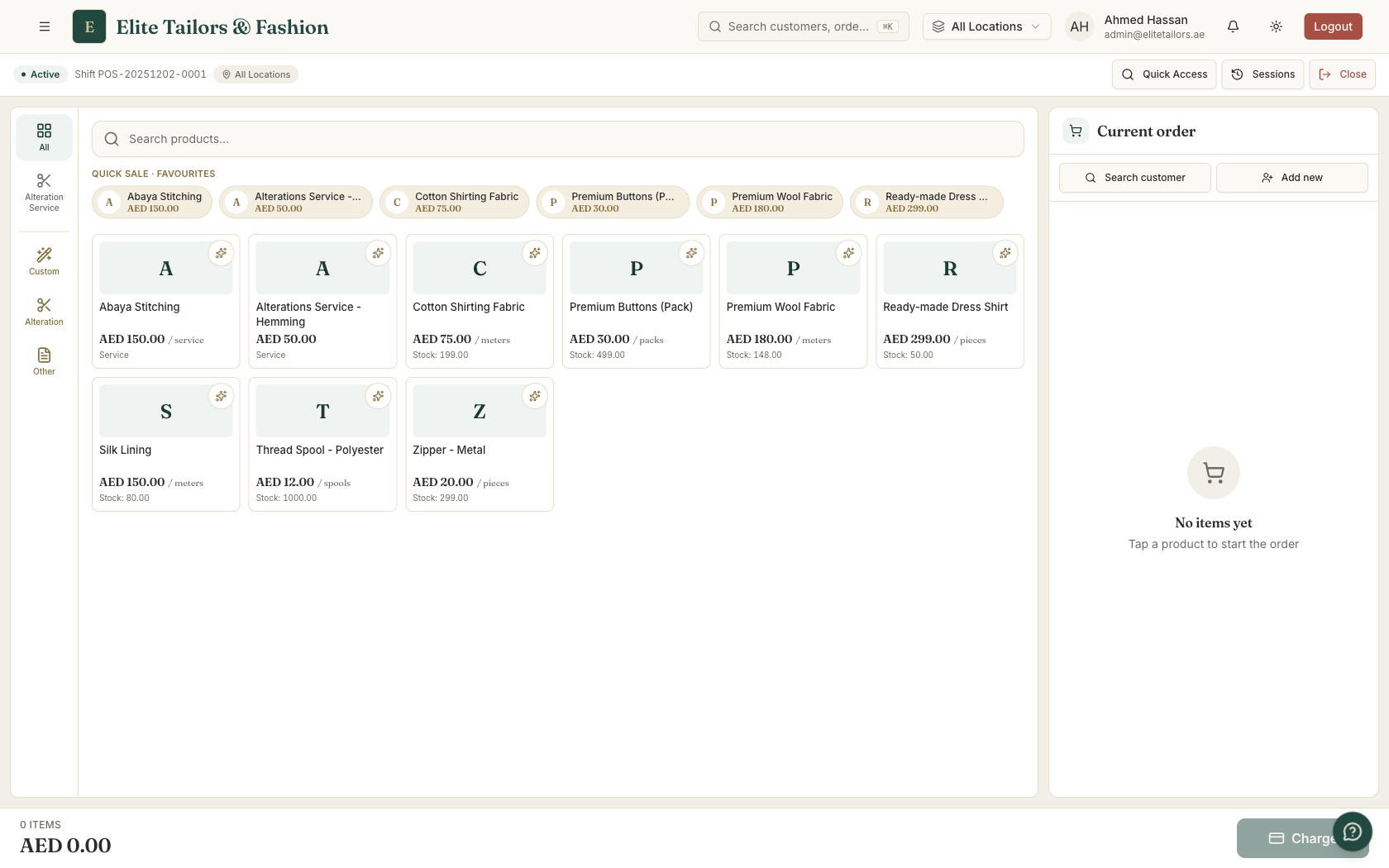
When the customer is ready to pay, you open the payment panel from the charge bar. For a plain retail sale you leave it on pay-in-full and choose cash, card, or a split across the two. Attaching a customer is optional, a walk-in can be rung up with nobody on file. One habit to keep: the till charges the exact total and does not work out change for you, so you count the change out of the drawer yourself. Complete the sale and it is booked, a receipt number is generated, and the print window opens.
If your shop is VAT-registered, the sale shows the tax split automatically from your settings, and the server recalculates the VAT on the total before it accepts the sale, turning away anything that does not add up. The tax on the receipt comes from your configuration rather than from the screen, which is what a clean FTA return depends on.
Full payment, or a deposit on custom work
The same counter books bespoke work, and bespoke work is rarely paid in one go. When a customer commissions a made-to-measure abaya or a kandura, you mark the sale as an order (or as an alteration for adjustments), set the delivery date they will collect on, switch the payment to deposit, and enter what they are paying now. The panel shows the balance still to collect. Completing it creates the workshop order first, a new tailoring order opens as Confirmed and waiting on production, then it records the deposit against that order as a receipt. The rest of the money rides on the order until the customer returns, so nobody is chasing it in a separate book. An order like this needs a real customer profile and a delivery date, not a blank walk-in, and the till stops you if either is missing.
A deposit taken here behaves exactly like an advance on an order written up from the Orders screen: you cannot collect more than the balance, and every payment lowers what is left there and then. The counter and the order book stay in step, whichever one the money comes through.
Printing the receipt
As soon as a sale completes, a print window opens so you can hand over the paperwork. The counter default is the 80mm thermal receipt, the roll most tailoring shops keep by the till, and you can print it, save a PDF, or do both. When the customer wants a full tax invoice you print an A4 or A5 instead, and a booked order can print an order form too. Whatever you choose already carries your shop branding, your tax number, and the VAT breakdown. POS receipts are the one place in TailorSync that use a gap-free, FTA-compliant numbering sequence, counted per branch and per year, which makes them the tidiest record to hand an accountant at VAT time.
Stock and cash settle themselves at the till
Two things happen quietly behind every sale. A ready-made line draws its quantity down from inventory the moment the sale completes, so the stock count stays honest with no second entry. Custom and alteration lines leave stock alone, since they are made to order rather than sold off the shelf. The till will also let you sell past zero on a fast-moving line: the sale still goes through and the stock simply reads negative, with only a quiet warning, so it pays to watch the counts on a busy morning.
Cash settles at close. When you end the session you count the notes and coins in the drawer, and the till adds your opening float to the cash you took during the shift to reach the expected cash, then sets it beside your count. It tells you on the spot whether the drawer balances, runs over, or comes up short, and you can leave a note explaining the gap. Card and online takings are left out of this sum, because only cash is actually sitting in the drawer.
You can close only your own session, and once a session is closed it cannot be reopened, so count carefully before you confirm. The figure is saved on the shift record for good, and it shows up again in that day's totals and payment breakdown.
Common questions
How does a point of sale work in a tailoring shop?
A POS is the counter till. You open a cash session at the start of the day with the float already in the drawer, ring up walk-in sales and deposits on custom work against it, print the receipt, and close the session at night by counting the drawer against what the system expected. In TailorSync a plain sale also draws the item down from stock, and every cash payment feeds that day's reconciliation.
Can a tailoring POS take a deposit instead of the full amount?
Yes. When a customer commissions bespoke work at the counter, you mark the sale as an order, set a delivery date, switch to deposit mode, and enter the amount paid now. The system books the workshop order, records the deposit as a receipt, and keeps the remaining balance on the order for collection. It will not let you take more than the balance.
Does the POS print a VAT invoice for UAE customers?
Yes. It prints an 80mm thermal receipt at the counter, or an A4 or A5 invoice, carrying your shop's TRN and the VAT breakdown from your tax settings. POS receipts use a gap-free numbering sequence per branch and per year, which is the kind of record a UAE FTA VAT return expects.
How does a POS help me balance the cash drawer?
At close it adds your opening float to the cash sales for the shift to work out the expected cash, then compares that with the amount you actually count. It tells you straight away whether the drawer balances, is over, or is short. Card and online payments are left out of the figure, since only cash ends up in the drawer.
Does selling at the POS reduce my stock automatically?
A plain catalogue sale draws the item down from stock the moment you complete it. Custom and alteration lines do not, because they are made to order rather than sold off the shelf. The POS will let you sell past zero on a busy line, where the stock simply goes negative with a quiet warning, so it is worth keeping an eye on your counts.
Keep reading