How to track bespoke tailoring orders, from measurement to delivery
The reliable way to track a bespoke tailoring order is to give it one status that moves in a single direction, from measured to cut to stitched to ready to collected, and to keep the customer's balance on that same record, so the state of the job and the money owed are never in two different places. This guide covers how a busy tailoring shop keeps dozens of custom orders straight without a paper order book, using TailorSync as the worked example.
Why a tailoring order is harder to track than a shop sale
A retail sale ends at the counter: money in, goods out, done. A bespoke order does not. It opens with a measurement and then lives for days or weeks (cut, stitched, maybe a fitting, then an alteration) before the customer comes back to collect. In between, someone has to know whose kandura is cut but not stitched, which abaya is promised for Thursday, and who still owes a balance. A tailoring order record exists to hold all of that in one place, for the whole life of the job.
Give every order a single status
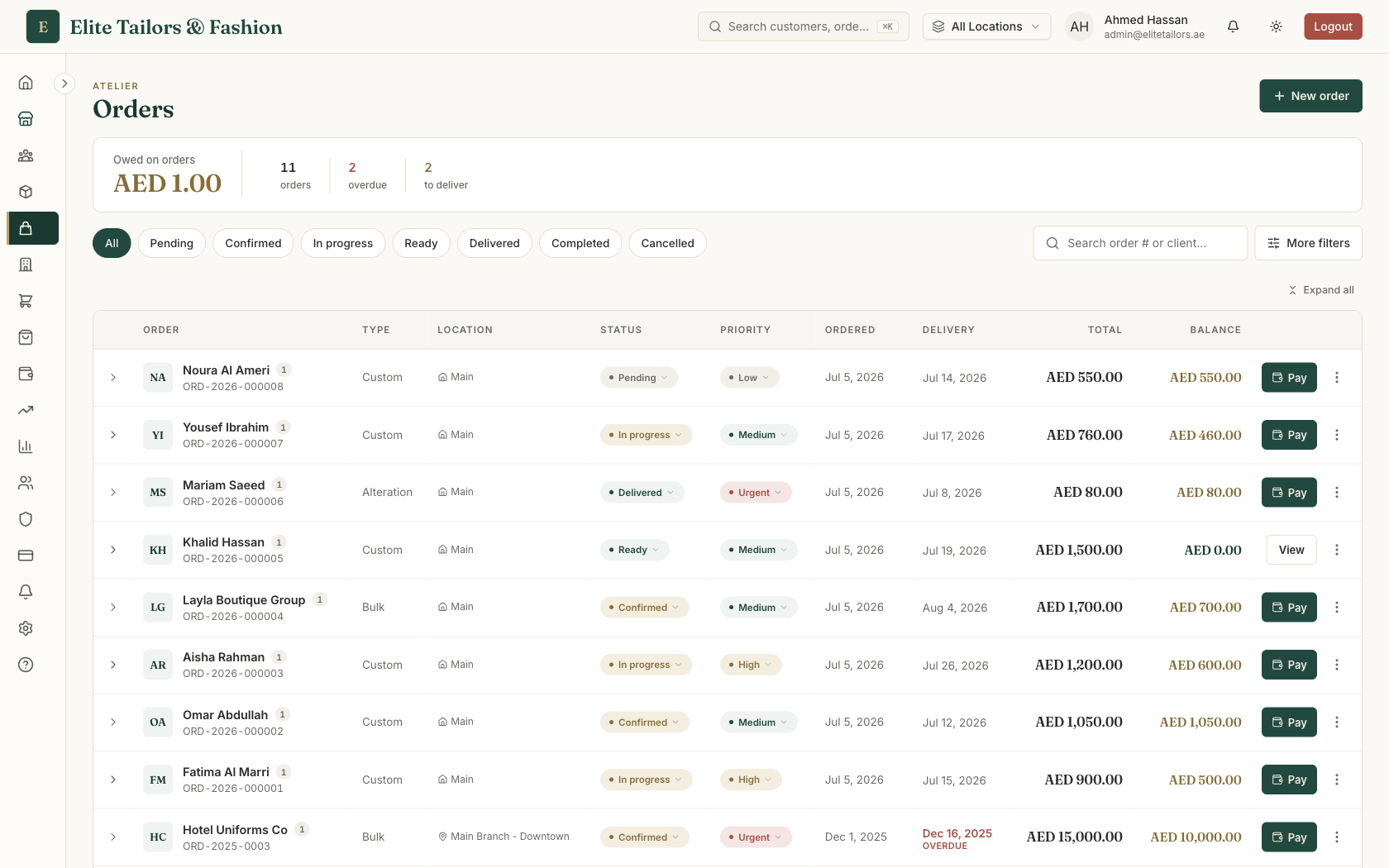
The backbone of order tracking is a status that everyone in the shop reads the same way. In TailorSync an order moves through Pending, Confirmed, In progress, Trial, Alteration, Ready, Delivered and Completed, with Cancelled for jobs that fall through. Not every order touches every stage. A simple hem might jump straight from Pending to Ready. But the sequence gives the shop a shared vocabulary: filter the list to Ready and you have today's collections; filter to In progress and you have the workbench.
Each order also carries a priority (Low, Medium, High, Urgent) and a delivery date. A good system warns you before a promise is broken. TailorSync turns a delivery date gold when it falls due within three days and red once it is overdue and the order still isn't finished, so the jobs that need attention rise to the top on a busy morning.
Track each garment, not only the order
One order can hold several garments, and they rarely progress in lockstep. So the order's overall status sits above a per-item stage that each garment moves through on its own: Pending, Cutting, Stitching, Finishing, Ready, Delivered. Next to the stage, record where the garment physically is, like Rack A-5 or Hanger 12, so that when the customer walks in, anyone on the counter can find it without hunting through the workshop.
Keep the balance on the order
Most tailoring is paid in two goes: a deposit when the order is taken, and the balance on collection. The trick is to keep that balance on the order itself rather than in a separate cash book, so the amount due shows every time you open the job and again when the customer collects. Record the advance up front and the order reads Paid, Partial or Unpaid on its own; take the rest later and the balance falls to zero. Because the money lives on the order, you can total the balance owed across every open order and know exactly what the workshop is waiting to collect.
Keep an audit trail. Every status change, payment and edit should be stamped with the time and who did it, so you can answer "when did this move to Ready?" or "who took that AED 200 deposit?" without guessing. In TailorSync this timeline is written for you as you work.
Finding an order when a customer calls
The test of good order tracking comes on the phone: "Is my abaya ready?" You need the answer in seconds, not after scrolling. Search by the phone number, which is unique to the customer and almost always returns a single order, or by their name or the order number. Open the row, read the status and delivery date, and you have the answer while they are still on the line.
This is the case for retiring the paper order book. One record carries the customer, their measurements, every garment's stage, the delivery date and the balance, all of it searchable and shareable, and none of it lost to a torn page.
Common questions
How do tailoring shops track custom orders?
Most shops track custom orders on a numbered order record that holds the customer, their measurements, the garments being made, a delivery date and the balance owed. Tailoring software replaces the paper order book by keeping all of that on one screen, adding a status you can filter by, and letting you search by name or phone in seconds.
What order statuses does a bespoke tailoring workflow need?
At a minimum: pending, in progress, ready for collection, and completed, plus a cancelled state. TailorSync uses a fuller set (pending, confirmed, in progress, trial, alteration, ready, delivered, completed) so a busy workshop can tell a confirmed order apart from one that is cut and on the machine, and can flag garments that need a fitting.
How do you track what a customer still owes on an order?
Record the deposit when the order is taken and let the balance ride on the order itself, so the amount due shows every time you open it and when the customer collects. TailorSync marks each order Paid, Partial or Unpaid on its own and totals the balance owed across all open orders.
Can one order track several garments at different stages?
Yes. A single order can hold several garments, and each one carries its own workshop stage (cutting, stitching, finishing, ready) separate from the order's overall status, plus a storage location so staff can find the finished piece when the customer arrives.
Keep reading