How to produce an FTA-compliant tax invoice in the UAE
An FTA-compliant tax invoice in the UAE has to show a fixed set of things: the words Tax Invoice, your business name, address and Tax Registration Number (TRN), a unique sequential invoice number, the date it was issued, the customer's name and address, a line for every item or service, the VAT rate and the VAT amount charged, and the totals in AED. Miss one of those and the document is not one the Federal Tax Authority recognises, which becomes your problem the day a customer's accountant asks for a proper invoice or an audit comes around. This guide covers what belongs on a tax invoice for a UAE tailoring or retail shop, how VAT-inclusive and VAT-added pricing differ, and how TailorSync fills in the compliant parts for you.
What has to be on the invoice
The FTA sets the list, and it is not long. A full tax invoice carries the words Tax Invoice somewhere clear, your business name, address and TRN, and a unique invoice number that no other invoice shares. It shows the date of issue, and the date of supply too if that falls on a different day. It names the customer and their address, and where the customer is VAT-registered, their TRN as well. Then come the goods or services: a description of each line, the quantity, the unit price, the rate of VAT that applies and the tax amount, along with any discount. At the foot sit the total before VAT, the VAT amount, and the gross total, all in AED.
A walk-in retail sale usually does not need the full version. When the customer is not registered for VAT, or the sale is under AED 10,000, the FTA allows a simplified tax invoice: the Tax Invoice label, your name, address and TRN, the date, a description of what was sold, and the total with the VAT amount shown. That is what an 80mm counter receipt is for, and it is why the POS slip is shorter than a full A4 invoice.
VAT-inclusive or VAT-added pricing
Two shops can charge the same money and print it two different ways. If your shelf prices already have VAT baked in, the invoice reads the tax back out of the price, so a AED 105 kandura is AED 100 plus AED 5 VAT. If you quote before tax, the VAT is added on top. In the UAE the price shown to a walk-in customer is meant to be VAT-inclusive, so the number on the ticket is the number they pay at the till; a wholesale quote to a boutique is more often given as a net price with VAT added on. In TailorSync you set this per order with the Tax Treatment choice, either Tax Included in Prices or Tax Added to Total, and the invoice does the arithmetic the right way round.
The rate itself is not something you type per invoice. It comes from your business tax settings, so the tax on every document matches your real VAT registration. A registered business defaults to the UAE standard 5% and will not quietly slip to 0%. You can hold a separate retail and wholesale rate, and the customer's type on their record decides which one applies. If your shop is not registered for VAT, the tax fields drop away and the rate simply reads 0%.
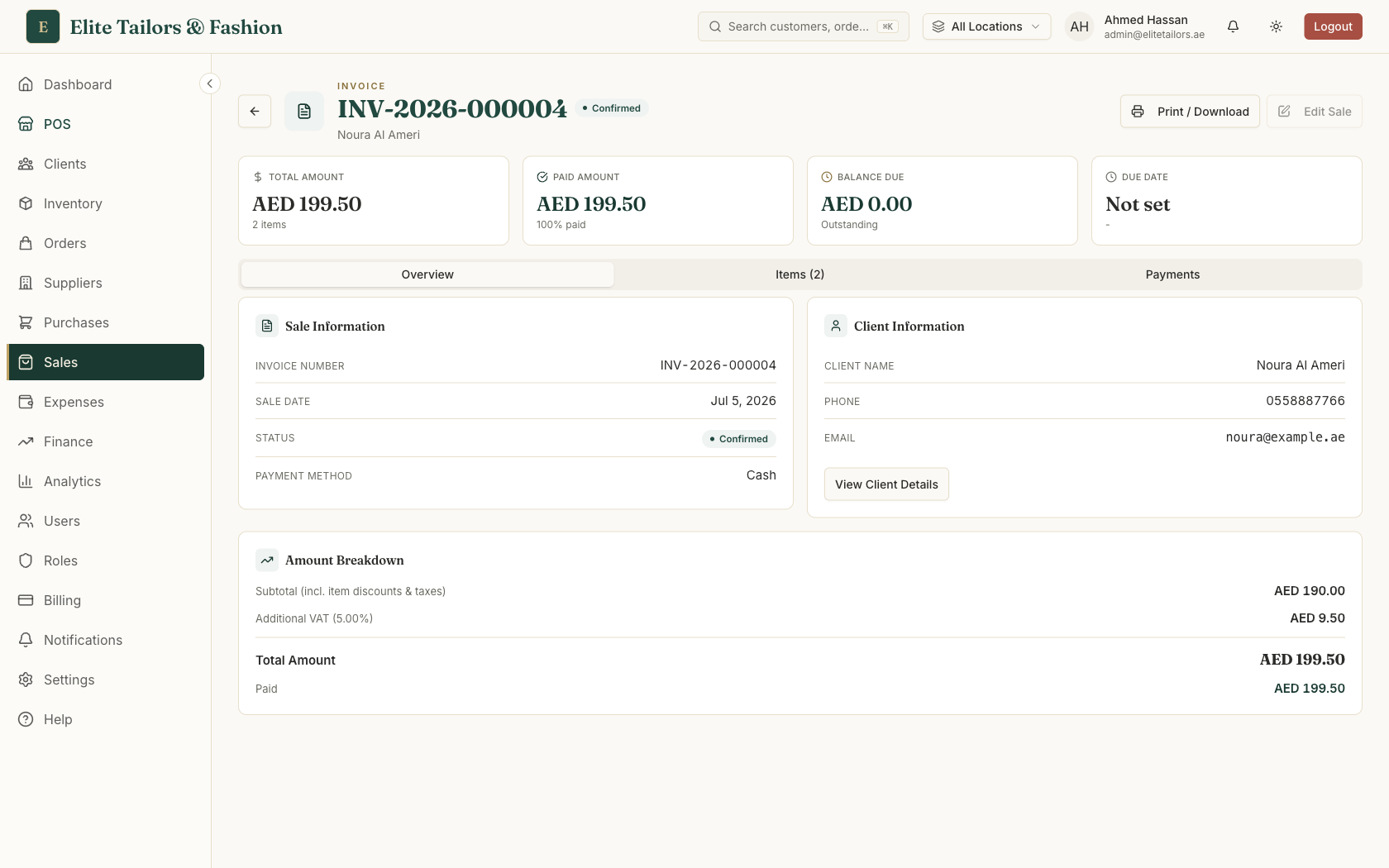
One detail worth getting right: VAT is charged once, on the net amount after all discounts, never tax stacked on tax. So the sum on the invoice reads subtotal, minus any discount, plus a single VAT charge, equals the grand total. That is the calculation the FTA expects, and it is the figure saved to the finished document in AED.
A unique, sequential invoice number
Every tax invoice needs a number that is unique and runs in sequence, with no gaps the FTA could read as a deleted invoice. This is the part shops most often get wrong on a spreadsheet, where two people save invoice 091 on the same busy afternoon. In TailorSync the number is assigned for you, in a form like INV-2026-000123, so you never type one and the count moves forward on its own. POS counter receipts go further still: they draw from a per-shop sequence that locks while it hands out the next number, so even with several tills ringing sales at once, no two receipts can take the same number and the run stays gap-free.
Your name, address, TRN, logo and footer come from your business settings, so every printed invoice and receipt carries them without you retyping anything. Fill those in once in Settings, then check the TRN reads correctly: an invoice missing its TRN is not a valid tax invoice, however tidy it looks.
After you issue it
A UAE tax invoice should be issued within 14 days of the date of supply, and you are expected to keep it for at least five years in case the FTA asks to see it. TailorSync stores every sale, order and POS receipt with its number, date and VAT breakdown, so that record is kept for you and stays searchable, rather than fading on a curl of thermal paper at the back of a drawer.
When your VAT quarter closes, the same invoices feed the VAT report, where the tax you charged customers (output tax) is totalled against the tax you paid on purchases and expenses (input tax). Because the figure is built from the invoices themselves, the amount you file is one your paperwork can stand behind.
Common questions
What must a UAE tax invoice include?
A full UAE tax invoice must show the words 'Tax Invoice', the supplier's name, address and TRN, a unique sequential invoice number, the issue date, the customer's name and address (and their TRN if they are registered), a description of each item or service with the quantity and unit price, the VAT rate and the VAT amount, and the totals in AED. A simplified tax invoice, allowed on sales under AED 10,000 or to customers who are not VAT-registered, needs fewer of these fields.
What is the difference between a full and a simplified tax invoice in the UAE?
A full tax invoice carries every required field, including the customer's name, address and TRN, and is what you issue to a VAT-registered business or on a larger sale. A simplified tax invoice is shorter: your name, address and TRN, the date, a description of the goods, and the total with the VAT amount shown. The FTA lets you use the simplified form when the customer is not registered for VAT or the supply is under AED 10,000, which covers most walk-in retail and counter receipts.
Should my prices include VAT or add it on top?
For displayed retail prices in the UAE, the amount on the ticket should already include VAT, so a walk-in customer pays the number they see. Wholesale and business quotes are more often given as a net price with VAT added on top. Either is fine as long as the invoice shows the VAT amount clearly. In TailorSync you pick Tax Included in Prices or Tax Added to Total on the order, and the tax is worked out to match.
How do I keep invoice numbers sequential and gap-free?
The FTA needs each tax invoice to carry a unique number in an unbroken sequence, because a gap can look like a deleted invoice. The safest way is to let the system assign numbers rather than type them by hand. TailorSync numbers every invoice for you, for example INV-2026-000123, and POS receipts use a per-shop sequence that locks while it issues the next number, so two tills can never grab the same one.
What VAT rate applies to tailoring and clothing sales in the UAE?
The UAE standard VAT rate is 5%, and it applies to tailoring services and clothing sales the same way it applies to most goods and services. A VAT-registered shop charges 5% unless a specific zero-rating or exemption applies, which is uncommon for tailoring. In TailorSync a registered business defaults to 5% and reads the rate from your settings, so it will not accidentally save an invoice at 0%.
Keep reading