Handling returns and cancellations under UAE VAT with a tax credit note
A tax credit note is the document that formally reverses a tax invoice you have already issued, and under UAE VAT you raise one whenever you refund a customer, take a return, or cancel or discount a sale after the invoice has gone out. The problem it solves is simple: once a tax invoice is issued its VAT is already in your books, so you cannot quietly delete it or write over the total when the deal changes. This guide covers what a credit note is, when the FTA expects one, and how a UAE tailoring or retail shop issues a compliant credit note without doing the paperwork by hand, using TailorSync as the worked example.
Why you cannot just delete the invoice
A tax invoice is not a draft you can quietly change. Once you hand it to the customer and count its VAT in your books, it becomes a filed record. So when the sale unwinds later (the customer brings the abaya back, an order is cancelled, or you agree a lower price after the fact), UAE VAT law does not let you erase the invoice or write over the total. You issue a second document that points back at the first and records the part you are taking off. That document is the tax credit note, and issuing it is a requirement of UAE VAT law, not an optional courtesy.
When a UAE business must issue one
There are three everyday situations. The customer returns goods and you refund them, in full or in part. An order or invoice that was already paid gets cancelled. Or the price drops after the fact, say you agree a discount once the invoice has gone out. In every case the amount the customer owes has fallen below what the tax invoice says, so the output VAT you charged is now too high. A credit note brings both the value and the VAT back down to what actually happened.
What the credit note has to reference
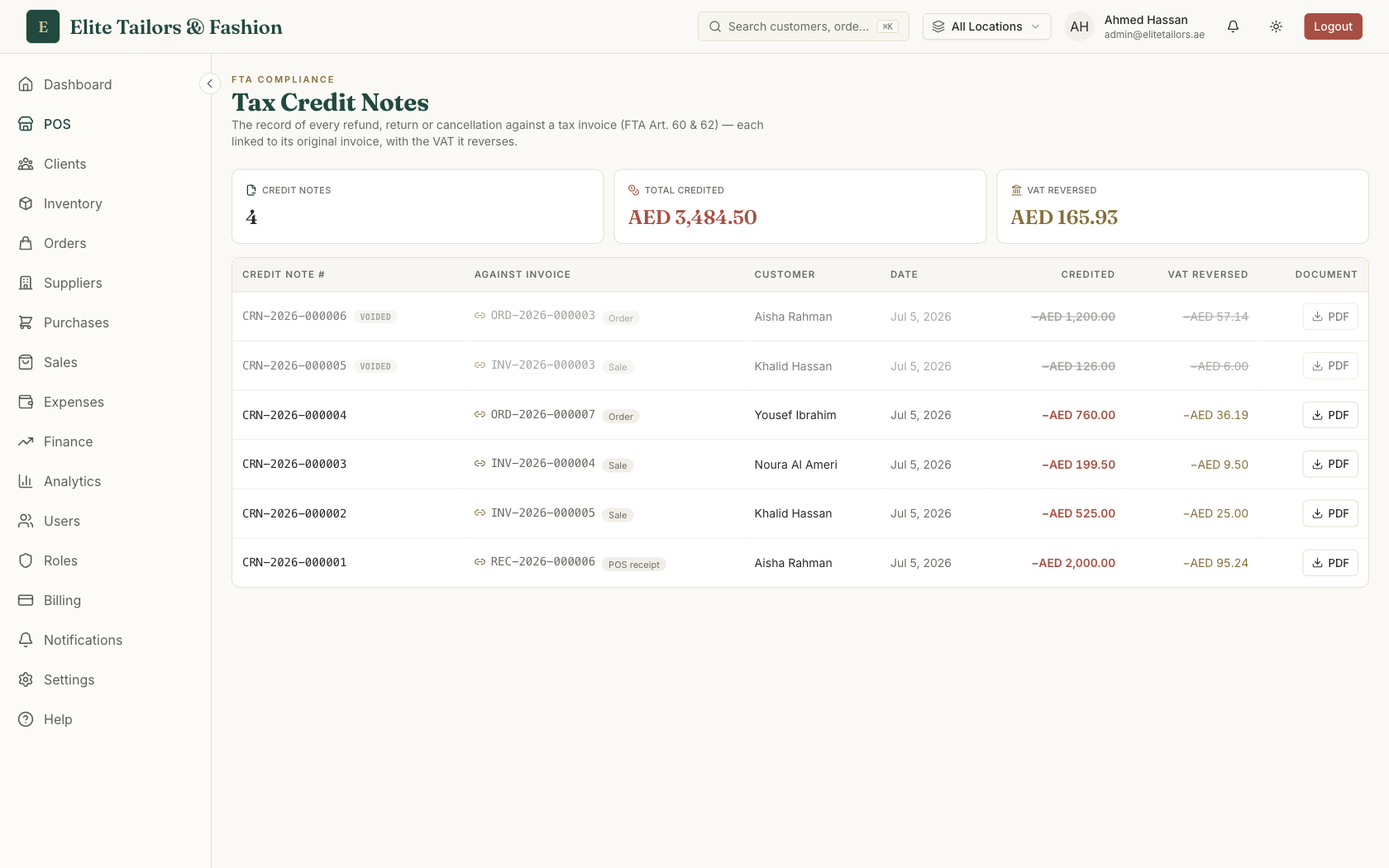
A credit note only holds up if it ties to the invoice it corrects. It carries its own sequential number, separate from your invoice numbers, and it names the original tax invoice along with that invoice's number, so an auditor can line the two up. It states the value being reversed and the VAT being reversed, both as negatives. The VAT comes off in proportion to the value: credit half an order and you reverse half its VAT, not a round figure you chose. That proportional reversal is what keeps your VAT return honest.
How TailorSync issues one for you
There is no 'new credit note' button, and that is deliberate. A credit note only stands up if it comes from a real reversal, so the system raises one on its own the moment you undo a paid tax invoice. Process a return or refund at the counter, cancel a sale invoice that was already paid, or cancel a paid tailoring order, and TailorSync stamps a credit note with its own number, links it to the original invoice, works out the value and VAT to reverse, and adjusts the balance so the account matches what actually happened. The finished note lands on your register ready to download as an FTA-compliant PDF you can hand or email to the customer.
The VAT on a credit note is a reduction to the VAT you owe, and the VAT report nets these off for you, so your return stays correct with no manual maths. The register itself sits under Finance, Invoices, behind the Credit notes toggle, since a credit note is the reverse of an invoice and the two belong together.
Mind the VAT period
One rule catches people out. If you reopen a cancelled sale or order and put it back to an active status, its credit note is voided. It stays on the register marked Voided and keeps its number, because a tax document must never be deleted, but it stops counting toward your reversed totals so the revived invoice does not carry a live reversal against it. The catch is timing. Only reopen within the same VAT period you cancelled in. If you have already filed the return for the period the credit note belongs to, leave it alone and raise a fresh invoice instead. TailorSync warns you when a credit note is from an earlier month.
Because the note is generated from the reversal itself, your paper trail builds as you work. Every refund, return and cancellation leaves a numbered document tied to its invoice, which is what an FTA audit asks to see.
Common questions
What is a tax credit note under UAE VAT?
A tax credit note is the official document that reverses a tax invoice you have already issued. UAE VAT law does not let you delete or edit the original invoice once its VAT has been reported, so when a sale is refunded, returned or cancelled you issue a credit note that references the original invoice and records the value and VAT you are taking back.
When does a UAE business have to issue a credit note?
Whenever the amount a customer owes falls below a tax invoice you already raised. In practice that means a return or refund, a cancelled order or invoice, or a price reduction agreed after the invoice went out. Each of these lowers the VAT you charged, so the credit note is what records that reduction for your VAT return.
What must a UAE tax credit note reference?
It must carry its own sequential number and name the original tax invoice, including that invoice's number, so the two documents tie together. It also states the value reversed and the VAT reversed as negative amounts. The VAT comes off in proportion to the value credited, not as a rounded figure.
Does a credit note adjust my VAT return automatically?
The VAT on a credit note is a reduction to the output VAT you owe. In TailorSync the VAT report nets these reversals off for you, so a VAT return that includes refunds and cancellations stays correct without manual calculation.
Can I cancel a credit note if I reopen the sale?
Yes, within limits. If you reopen a cancelled sale or order in the same VAT period, its credit note is voided: it stays on record with its number kept (tax documents must never be deleted) but no longer counts toward your reversed totals. If you have already filed the return for that period, do not reopen. Raise a fresh invoice instead.
Keep reading