Piece rate pay for tailors: how to work out and pay what each tailor earned
Updated · By the TailorSync team, built by a UAE tailoring family
Piece rate pay means paying a tailor a set amount for each piece they finish at a stage, such as AED 25 for stitching a kandura, instead of a fixed monthly wage. To run it without arguments, a shop needs three records: the rate for each person and stage, the pieces each person finished, and every payment and advance made against that. This guide shows how a tailoring workshop keeps those three records in TailorSync, from setting the rates to printing a statement the tailor can check line by line.
Why workshops pay by the piece
Many tailoring workshops pay some of their tailors by the piece, freelancers especially. Pay follows output, and the shop can pay one rate for a plain kandura and a higher one for a wedding piece that takes more work. The hard part is the counting. Someone has to add up every finished piece at the right rate and take off every advance, and a tailor who is paid every week will check the sum. A notebook works until two people write in it, or a piece gets counted twice.
Piece rates, Team output and Team pay come with Workshop tracking, in the free trial and the Expansion and Enterprise plans. Team pay is not payroll: staff on a monthly salary stay in Expenses.
Set a rate for each person and stage
A piece rate belongs to one person at one stage, because the same tailor may stitch for one rate and finish tassels for another. On the Team tab of the Workshop page, tap the piece rates button on the person's row. There is a box for each stage they do: type the rate for one piece, or leave the box empty for no rate, and save. The Team tab then shows the rates under the name, like Rates: Stitching AED 15.00 · Cutting AED 5.00.
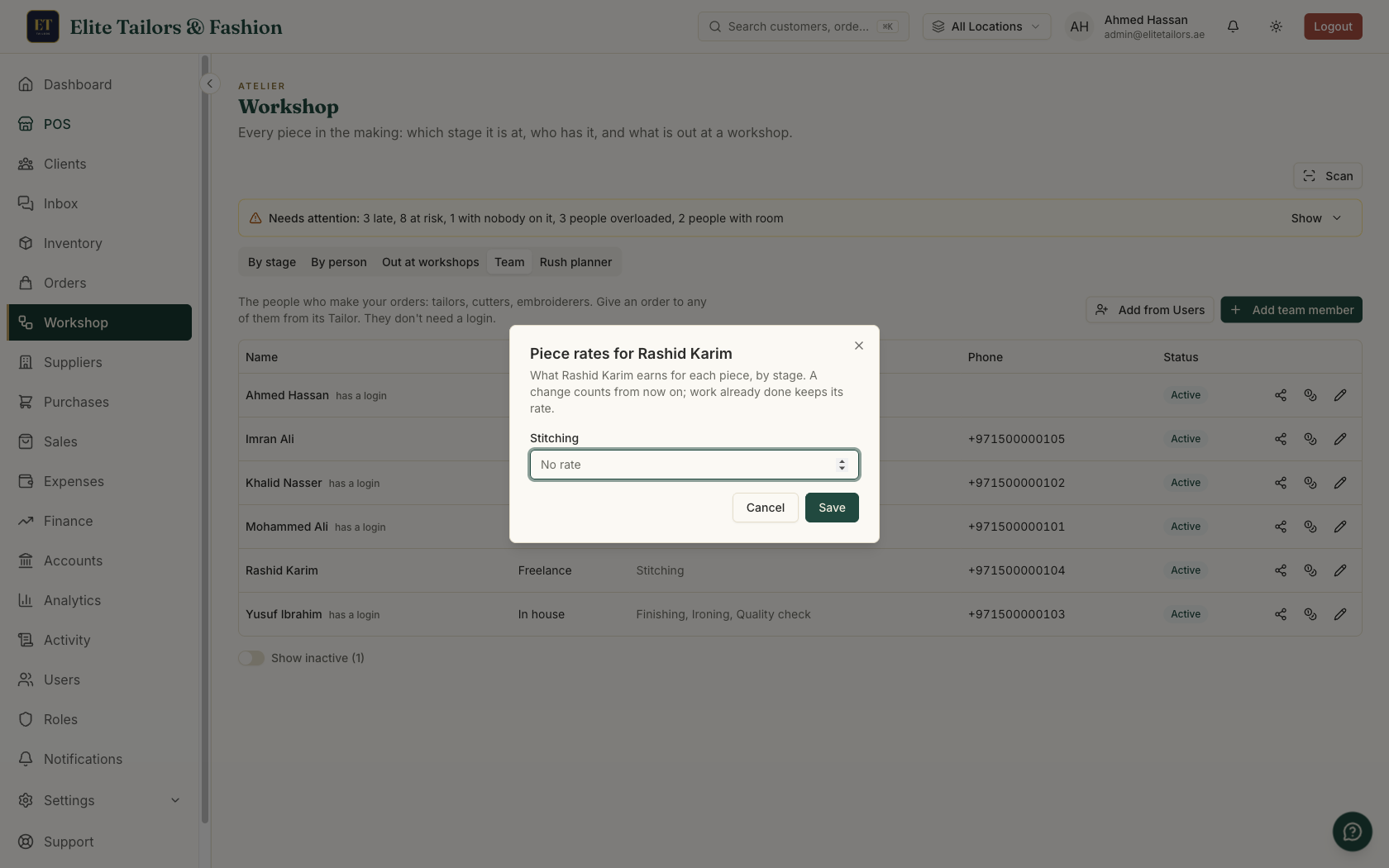
A new rate counts from then on. Work already done keeps the rate it was done at, so raising a rate in the middle of the month never changes what last week paid.
A different rate for one job
Some pieces take more work than the usual rate covers. Open the job card, find Pay for this card, tap Change on the step and type the rate for this card only. In the episode, the groom's own wedding kandura gets gold embroidery and more hand work, so his stitching pays AED 40 on that card while the other three pay the tailor's usual AED 25. Use Rashid's rate (with the person's name) puts the card back on the person's own rate.
The pay for a step is fixed the moment it is marked done. It is the card's own rate if it has one, otherwise the person's rate for that stage. With neither, the pieces still count and nothing is earned. Work sent to an outside workshop has no piece rate on the card: its price goes on the send-out, and you pay the workshop with a bill, as workshop production tracking explains.
Count what each person finished
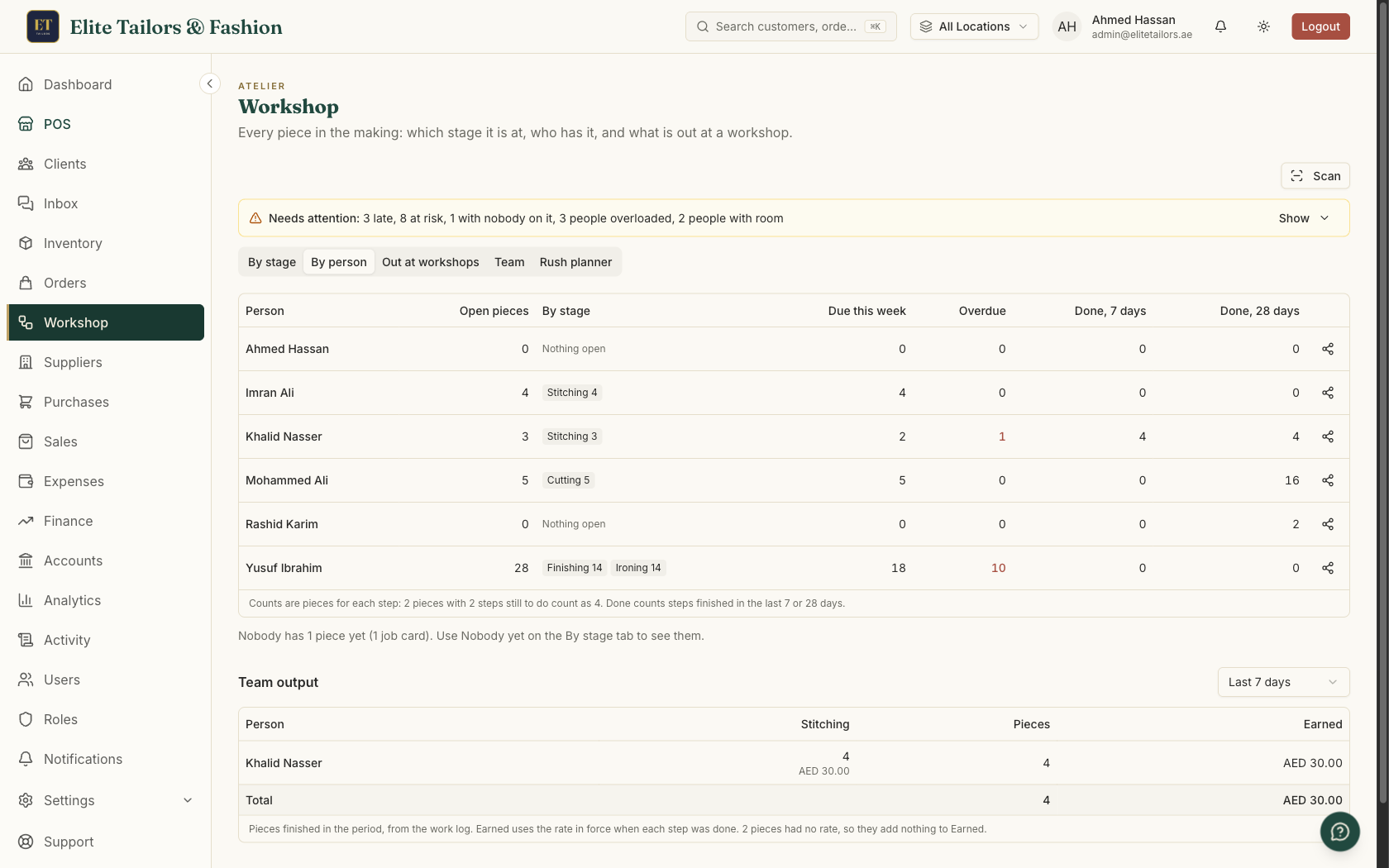
Under the table on the By person tab, Team output lists the pieces each person finished over a period: Last 7 days, This month, Last month or Custom, up to a year. Each row shows the pieces at each stage and what they earned, with Pieces and Earned totals, and a line under the table counts any pieces done with no rate. The counts come from the work log, so a step marked done by mistake and then undone drops out again.
What you owe each person
The Team pay tab keeps an account for each person. What you owe them is:
- what they earned at your piece rates - minus what you paid them - minus advances and deductions - plus or minus any adjustments, and an opening balance if you set one.
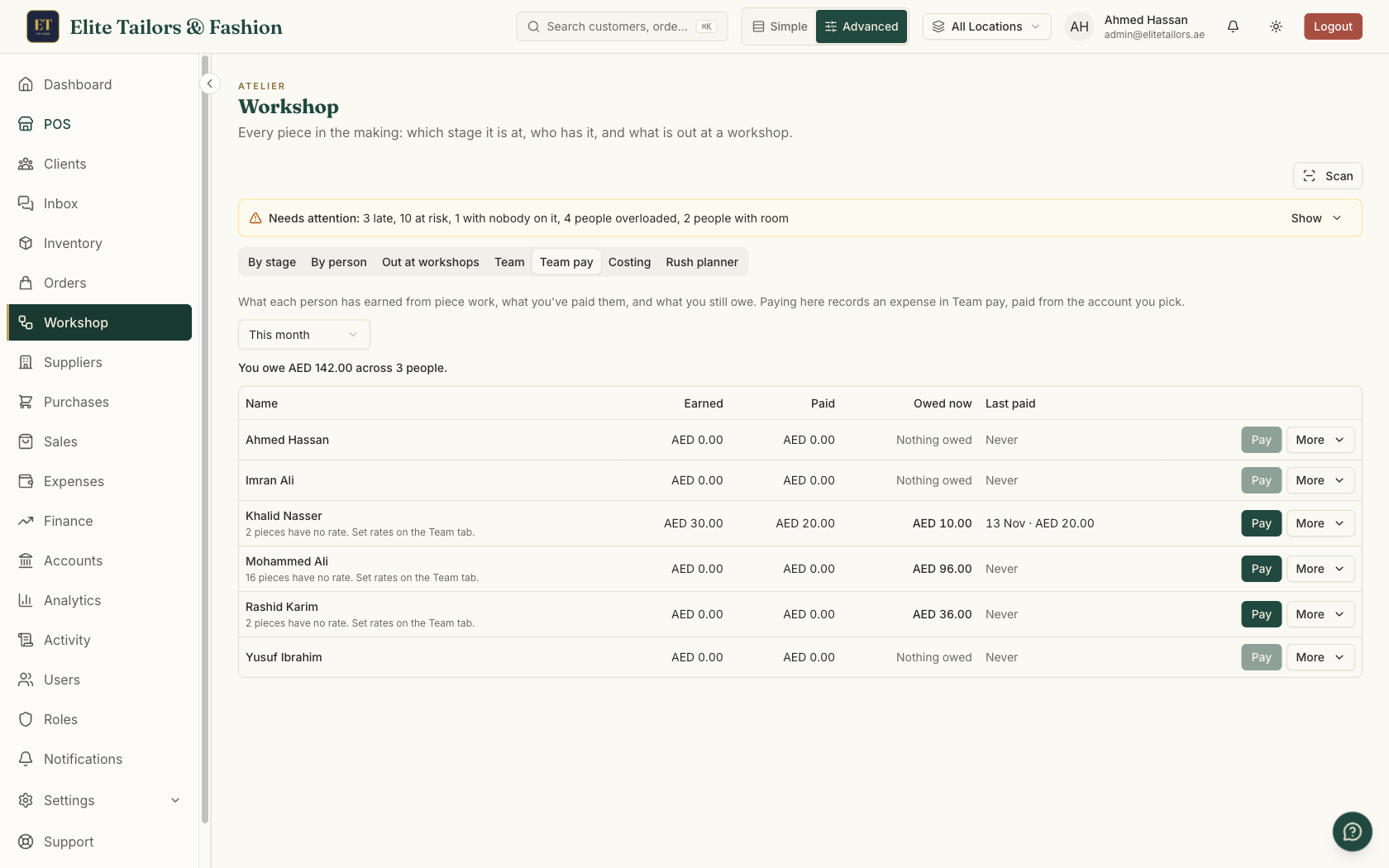
The tab opens with a line like You owe AED 1,240.00 across 3 people. Each person's row shows Earned and Paid for the period you pick, Owed now as of today, and Last paid. If some of their work has no rate, the row says so, and you can set it before payday.
Pay them
- 1
On the person's row, tap Pay. The box shows Owed now.
- 2
Type the amount, or tap Pay all owed.
- 3
Pick Paid from: one of your active cash or bank accounts.
- 4
Check the date (today or earlier) and save.
A payment can't be more than you owe. It is recorded as an approved expense in the Team pay category, titled like Team pay: Rashid, and the money comes out of the account you picked, so your month-end reports and your cash count both see it.
Advances, deductions and opening balances
Tailors often ask for money before the work is done. Advance, in the More menu on their row, gives money now that comes off what they earn later. Unlike a payment, an advance can be more than you owe, so the balance can go below zero until the work catches up. It is recorded as an expense too, titled like Advance: Khalid.
Deduct takes an amount off what you owe with no cash moving, for something like damaged work. Adjust adds or takes off an amount to put something right. Both need a note, so the statement says why. If you already owed someone money, or had paid them ahead, before you started, set an Opening balance once.
A statement the tailor can check
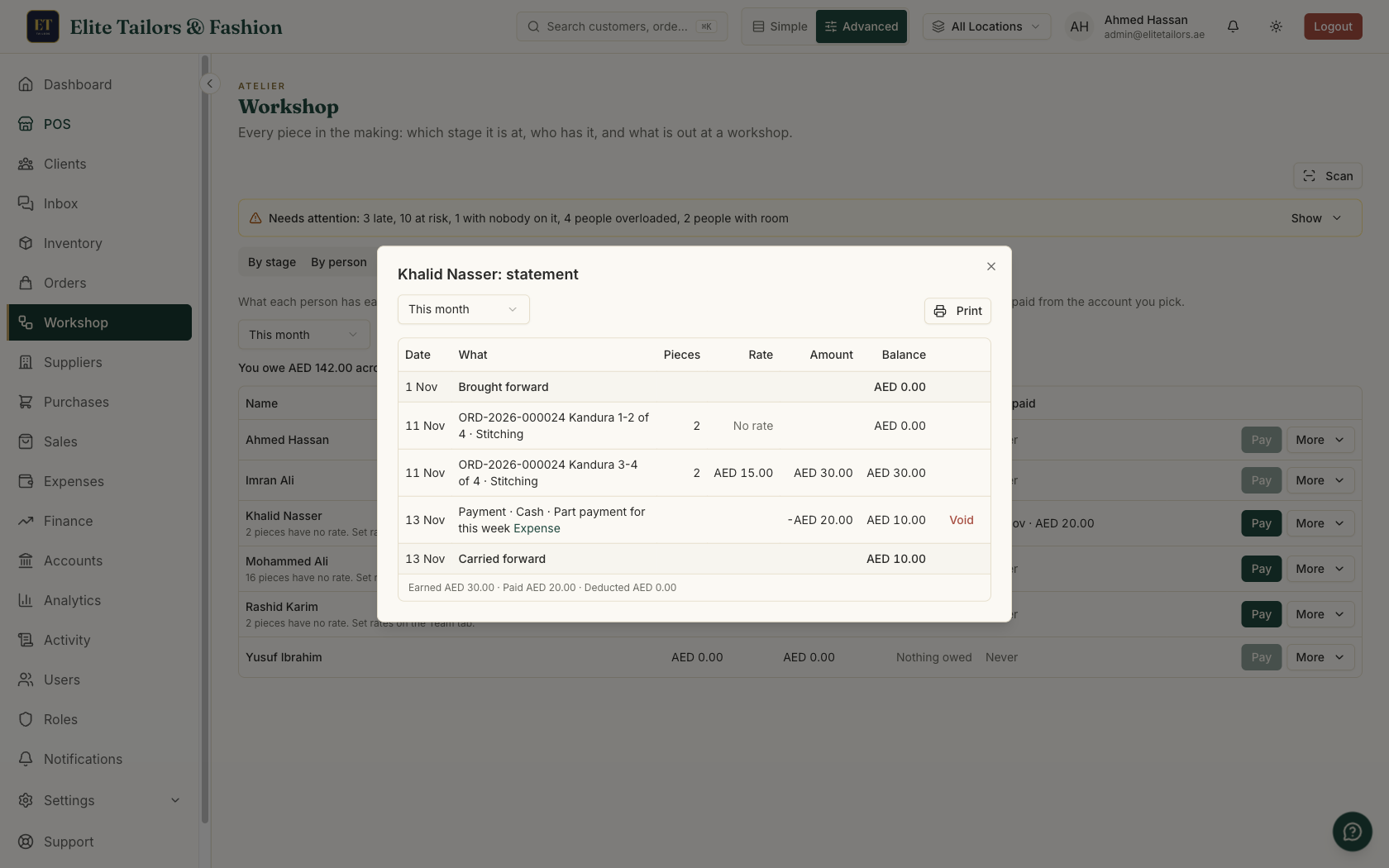
Statement, in the More menu, lists everything for a period. It starts with Brought forward, then every piece of work (order, garment, stage, pieces, rate and amount) and every payment, advance and deduction by date, each with the running balance after it, and ends with Carried forward. Print it or save it as a PDF and hand it over with the cash. If an entry is wrong, Void it: a voided payment's expense is rejected and the money goes back into the account.
Let tailors see their own earnings
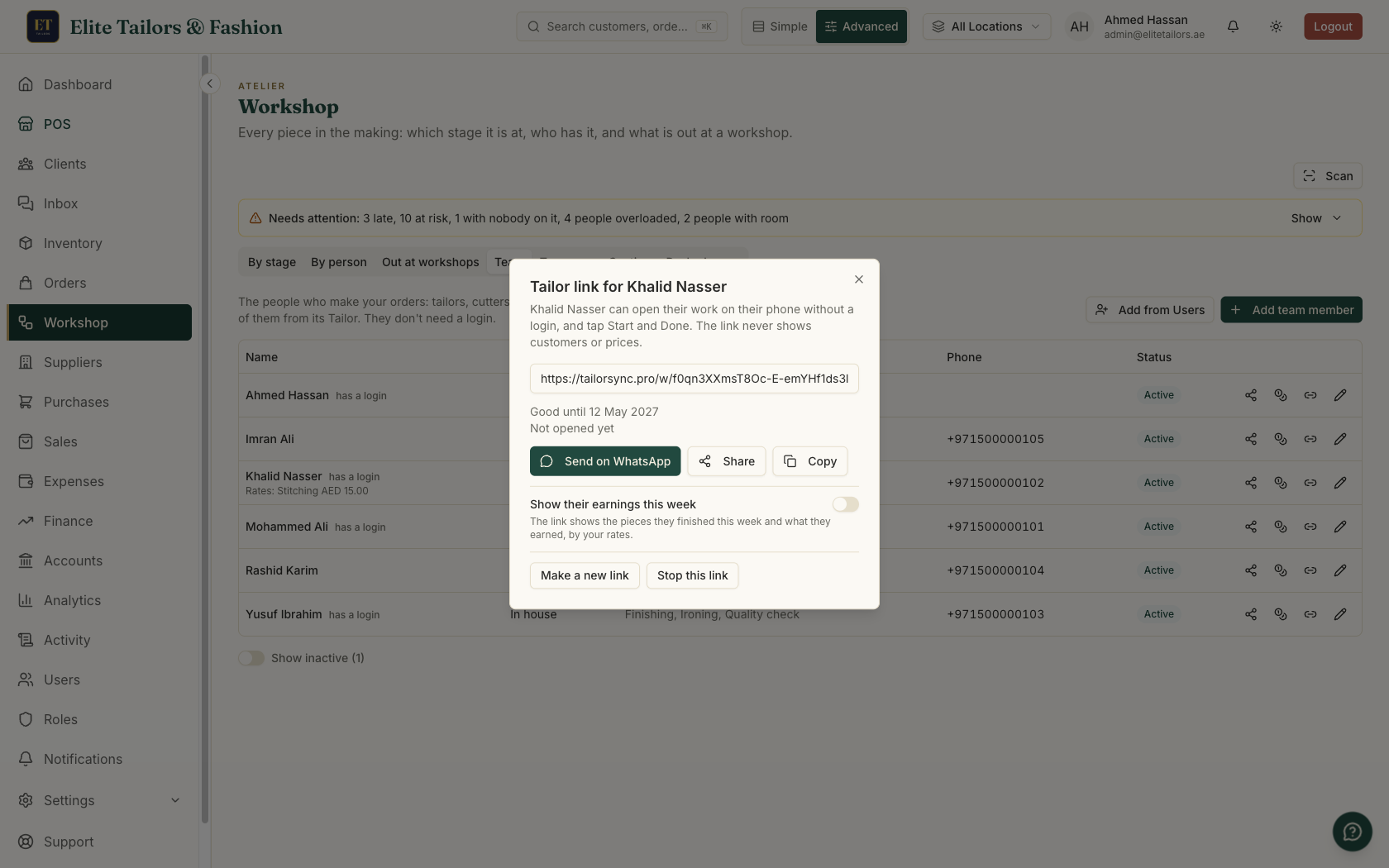
A tailor who can see the count during the week has fewer questions on payday. Give them a tailor link from the Team tab: it opens their own work on their phone, with no login, and they tap Start and Done as they go. Switch on Show their earnings this week and the page adds a line like This week: 23 pieces, AED 345.00. The week starts on Monday. The page never shows customer names, phone numbers, order prices or anyone else's work.
Who sees the money
Rates and earnings show only to people with the two Team pay permissions: See piece rates and what the team earned, and Set piece rates and record team pay to change rates or pay. Shop owners have both and can give them to other roles. Everyone else sees the pieces with no amounts. If you have connected Claude or ChatGPT to your shop, an owner can ask How much do I owe Khalid? or Pay Khalid AED 300 from Cash, and a payment is only recorded after you confirm it.
Common questions
What is piece rate pay for tailors?
It is paying a tailor a set amount for each piece they finish at a stage, such as stitching or cutting, instead of a fixed wage. In TailorSync you set a rate for each person and stage, and their earnings add up as their steps are marked done.
Can one tailor have different rates for different stages?
Yes. Each person has one rate for each stage they do, so a tailor can earn one rate for stitching and another for tassels or finishing.
What if one piece takes more work than usual?
Give that job card its own rate under Pay for this card. It counts for that card only, and the person's usual rate stays the same for everything else.
How do I record an advance to a tailor?
Use Advance in the More menu on their Team pay row. It comes out of the cash or bank account you pick, goes into your expenses, and comes off what they earn later. An advance can be more than you owe them.
Does Team pay replace payroll?
No. Team pay is for work paid by the piece. Staff on a monthly salary stay in Expenses.
Watch it
Keep reading