Tailoring order costing: what each order cost to make, and what you kept
Updated · By the TailorSync team, built by a UAE tailoring family
Order costing adds up what a tailoring order really cost to make (the fabric and stock it took, the materials used on each garment in the workshop, what you paid the tailors for each piece and what an outside workshop charged) and takes it off the price, so you can see the margin on that one order. Done for every order, it shows which garments pay their way and which only keep the workshop busy. This guide shows how TailorSync gathers those figures while the work happens, so nobody has to fill in a cost sheet afterwards.
Why a price list is not a costing
A shop sets its prices before the work, from experience and from what the street charges. How to price bespoke tailoring covers that side. Costing checks the price afterwards, against what the order really took. Two kanduras at the same price can cost very different amounts: one plain, one with stones, hand embroidery sent out to another workshop and a tailor paid extra for the fiddly work. Unless those costs are written down as they happen, the margin on each order is a guess.
Order costing comes with Workshop tracking, in the free trial and the Expansion and Enterprise plans. Because it shows cost prices and margins, it has its own permission, which managers and shop owners have.
The four parts of what an order cost
- 1
Fabric and stock: everything the order took from stock when it was saved, ready-made items included.
- 2
Materials: what the job cards used in the workshop, such as stones, lining or buttons, less anything returned.
- 3
Team: the piece rates on the steps your own team finished. See piece rate pay for tailors.
- 4
Outside work: the pieces a workshop sent back, at the rate on the send-out.
Each part is gathered from work the shop already records. The fabric leaves stock when the order is taken, a piece rate is fixed when a step is marked done, and an outside rate is typed when the pieces go out.
Record the materials on the job
The fabric is taken when the order is saved, but the extras are used later, in the workshop. Open the job card's menu and pick Use material, choose the stock item, type the quantity, add a note if you like, and tap Use. It comes out of stock at once and shows under Used on this card. In the item's history it reads like Material used: 2 pcs Stones.
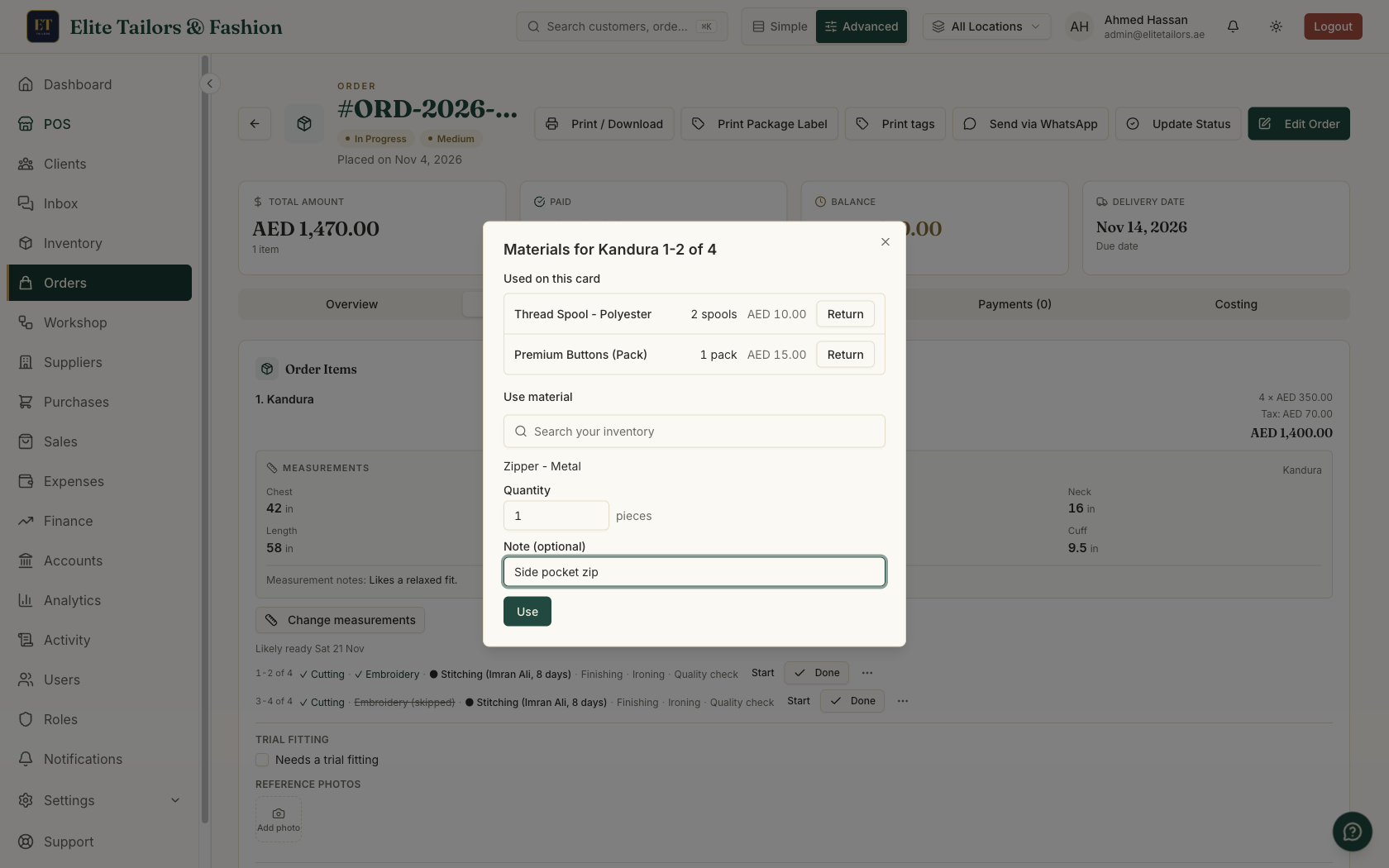
If more was taken than the job needed, Return puts it back in stock and takes it off the card's cost. If you pick the same shop fabric the order already took for that garment, TailorSync asks before taking it twice. Using material never stops at zero: if the shelf runs out, the use still goes through and a warning tells you the new stock level, so you can put the count right.
Read an order's Costing tab
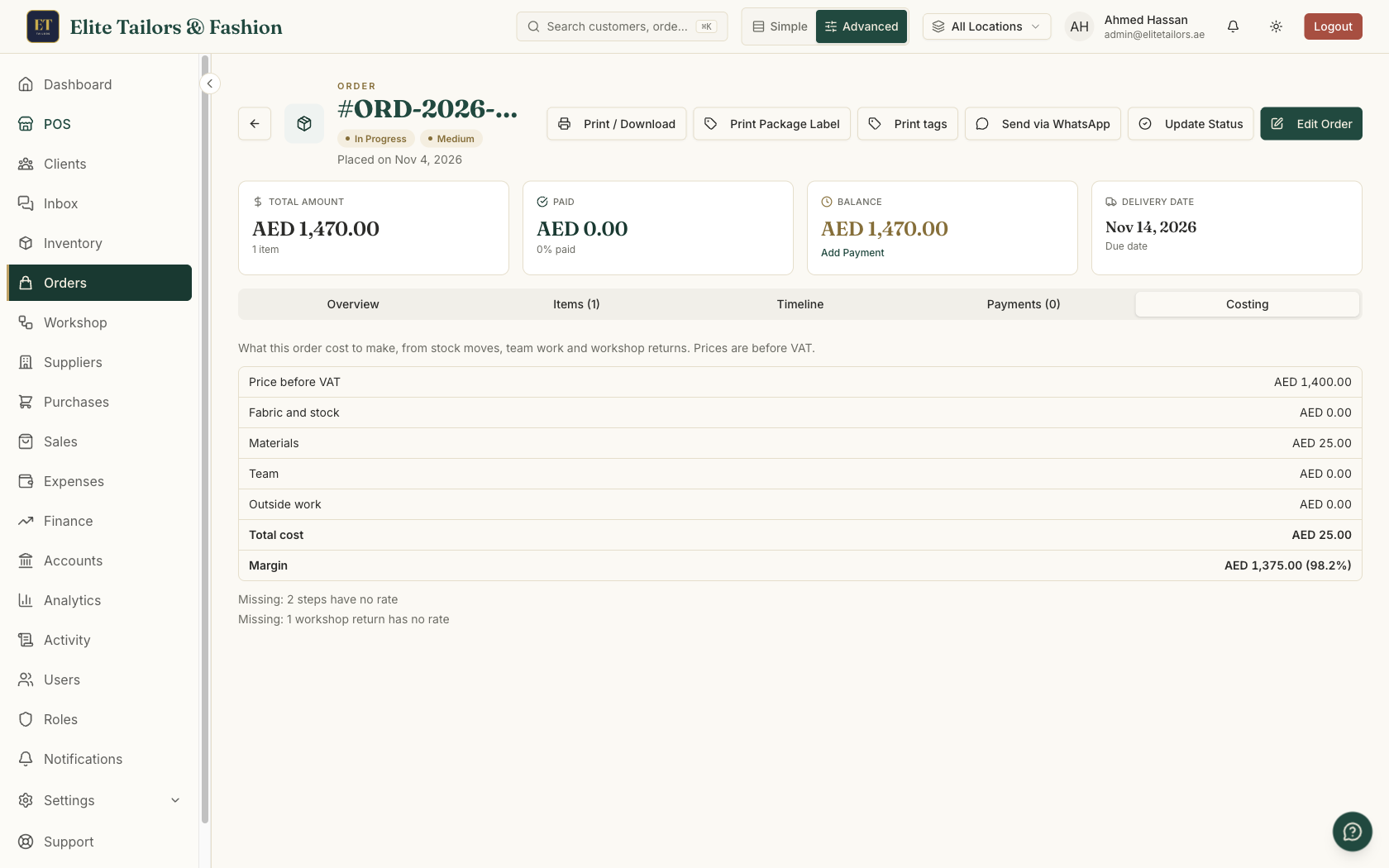
Open the order and tap Costing. Every line is before VAT: Price before VAT, then the four cost parts, Total cost, and Margin, with a percent. Each part is rounded to your shop's decimals, so the lines add up as shown. A workshop's bill is never counted again on top of its send-outs.
What the Missing line tells you
Under the table, lines starting Missing: name anything that counted as zero, such as 2 steps have no rate or 3 items have no cost price. An item with a cost price of 0 counts as having none. Each one means the real cost is higher and the margin lower than shown. Setting the rate or the cost price fixes the figures from then on. Work already done keeps the figure it had, so that order keeps its Missing line as a reminder.
Compare your garments over a month
The Costing tab on the Workshop page looks across all your orders. Pick a period and it shows a row for each route, which in practice means each kind of garment: Orders, Pieces, Cost per piece and Total margin. An order counts in the period when all its workshop work finished. An order whose garments follow different routes goes under Mixed routes, because its price isn't shared out between lines.
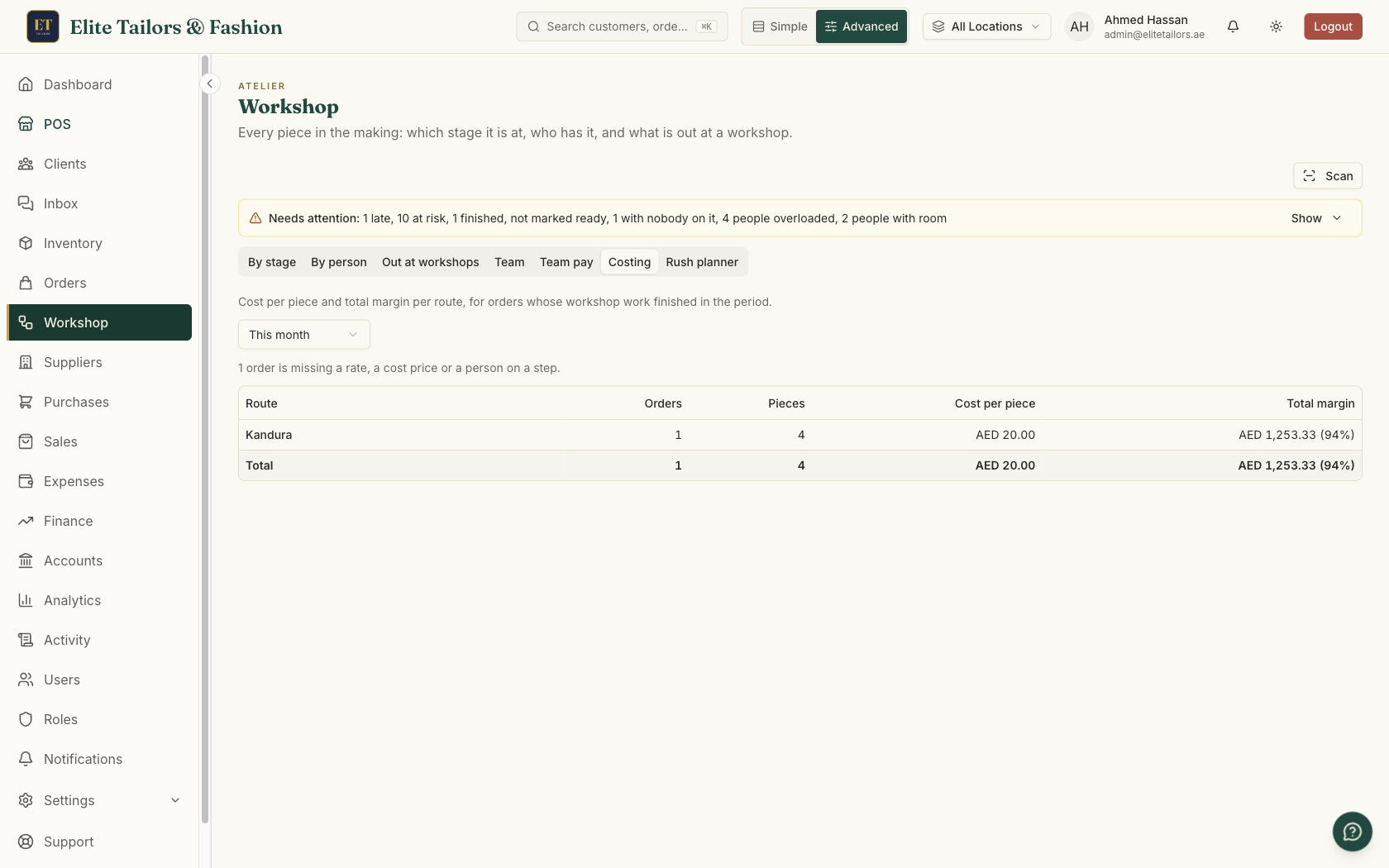
Look at it each month next to your price list. If the cost per piece of wedding kanduras has crept up because more of them go out for embroidery, the price may need to follow. If one route makes little margin for a lot of workshop time, that is worth knowing before the next busy season. A connected assistant can answer the same questions: ask Claude or ChatGPT What did ORD-2026-000004 cost us?
Common questions
How do I work out what a tailoring order cost?
Add the fabric and stock it took, the materials used on its garments, what you paid your tailors for each piece and what outside workshops charged, then take the total off the price before VAT. In TailorSync the Costing tab on the order does this from the work already recorded.
Does the costing include VAT?
No. The price and every cost on the Costing tab are before VAT.
What if an item has no cost price?
It counts as zero and is named on a Missing line under the table, so you know the real margin is lower. Set a cost price on the item and later orders count it.
Is a workshop bill counted twice?
No. Outside work is counted from the send-outs at their rate, and the bill you make from them isn't added again.
Who can see order costing?
People with the permission to see order costing and the costing report. Managers and shop owners have it, and the owner can give it to other roles on the Roles page.
Watch it
Keep reading