Tailoring workshop production tracking: job cards, stages and outside workshops
Updated · By the TailorSync team, built by a UAE tailoring family
Workshop production tracking gives each garment line on an order a job card that moves through the stages your shop uses, such as cutting, stitching, embroidery and ironing, and records who has the pieces at every step. Anyone in the shop can then see where a garment is and who has it from one screen. This guide shows how that works in TailorSync, from switching it on to sending pieces to an outside workshop and taking them back.
 Watch it · 3:11Track every garment through your workshopSeason 4, Episode 1
Why an order status is not enough in the workshop
A status such as In progress tells the counter that work has started. It doesn't say which of four kanduras is still at the cutting table, which two went out for embroidery, or which tailor has the rest. The workshop works in pieces and steps, so its record has to as well. Tailor order tracking covers the order itself: the customer, the measurements, the delivery date and the balance. Workshop tracking covers what happens to each garment between the order and the pickup.
Workshop tracking comes with the Expansion and Enterprise plans. The Team list and the Tailor on each order work on every plan.
Stages and routes
A stage is one kind of work, like Cutting, Stitching, Stone work or Quality check. A route is the list of stages one kind of garment goes through, in order. Routes are picked by the garment's name, so a line called Kandura gets the kandura route by itself, and an item in your stock can be linked to its own route. A stage only some pieces need, like embroidery, can be marked optional.
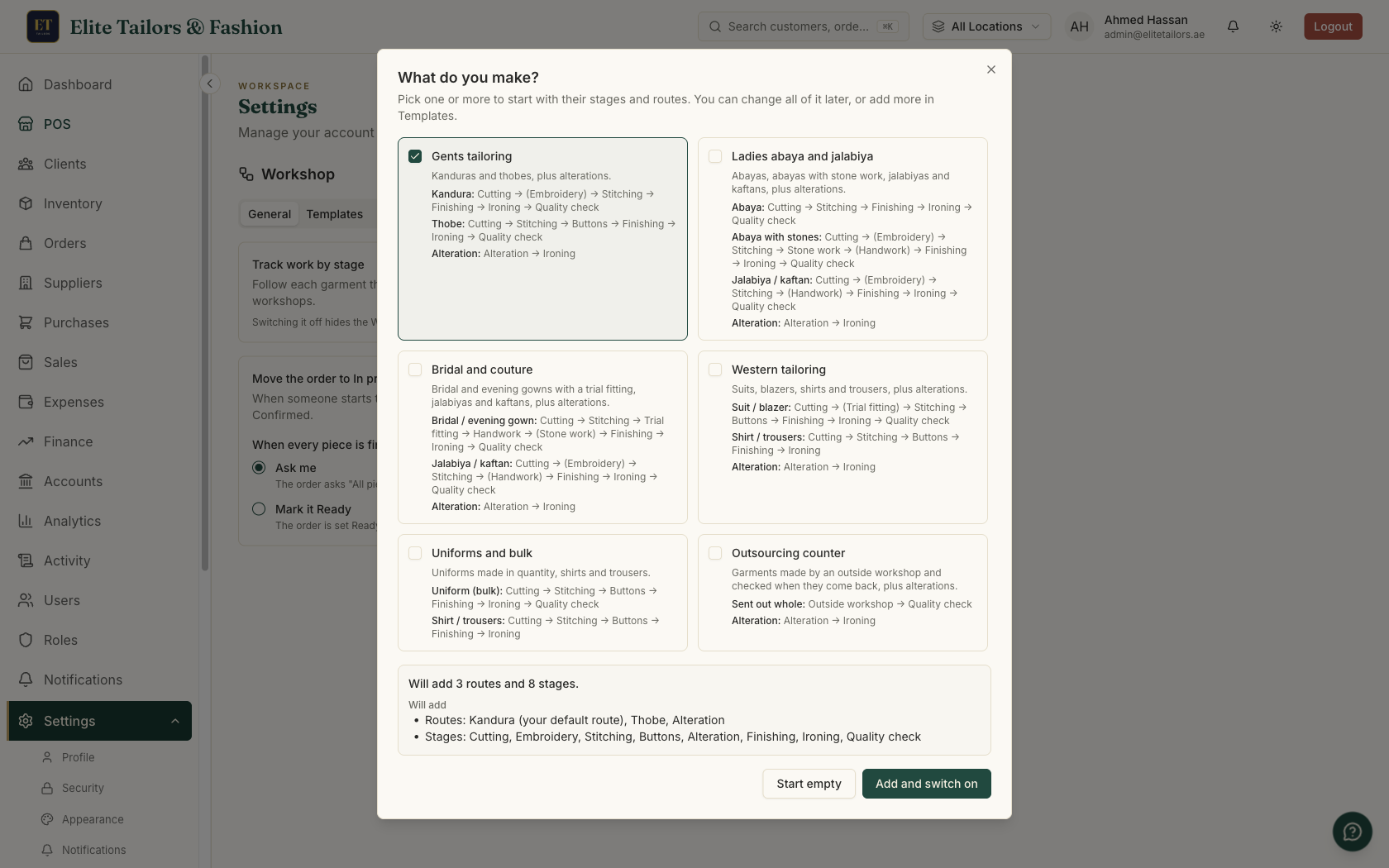
You don't have to build them from nothing. The first time you switch Workshop on, TailorSync asks what you make and offers starter sets: Gents tailoring (kandura, thobe and alteration), Ladies abaya and jalabiya, Bridal and couture, Western tailoring, Uniforms and bulk and Outsourcing counter. Each set adds its stages and routes, and you can rename or change any of them afterwards.
The people who make the clothes
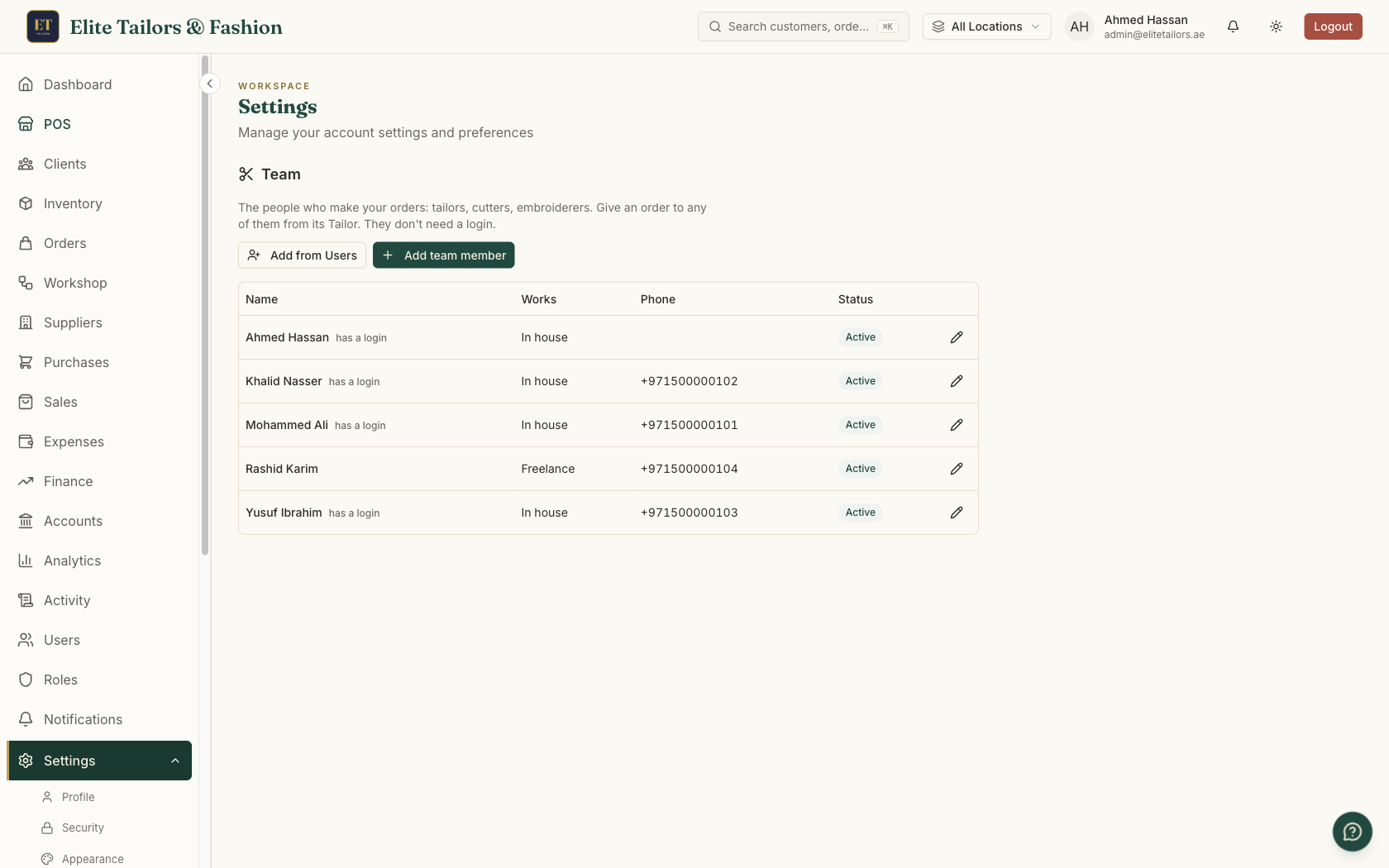
Most tailors never sign in to shop software, so the names on a job card come from a Team list, kept apart from your users. Add each person with their name, whether they work in house or freelance, a phone number if you like, and the stages they do. Team members don't need a login, and they don't count as users on your plan.
On each route you can say who usually does a stage. Leave a stage with nobody set and its step goes to the tailor chosen on the order, as long as it is a stage that tailor does. Anything else waits under Nobody yet until someone gives it out.
One job card per garment line
When an order is taken, each garment line gets a job card with the steps of its route. Four kanduras on one line start as one card of four pieces and move together. On the order, each garment shows a route bar: a tick for each step done, a dot where the pieces are now with who has them and for how long, and an arrow when they are out at another workshop.
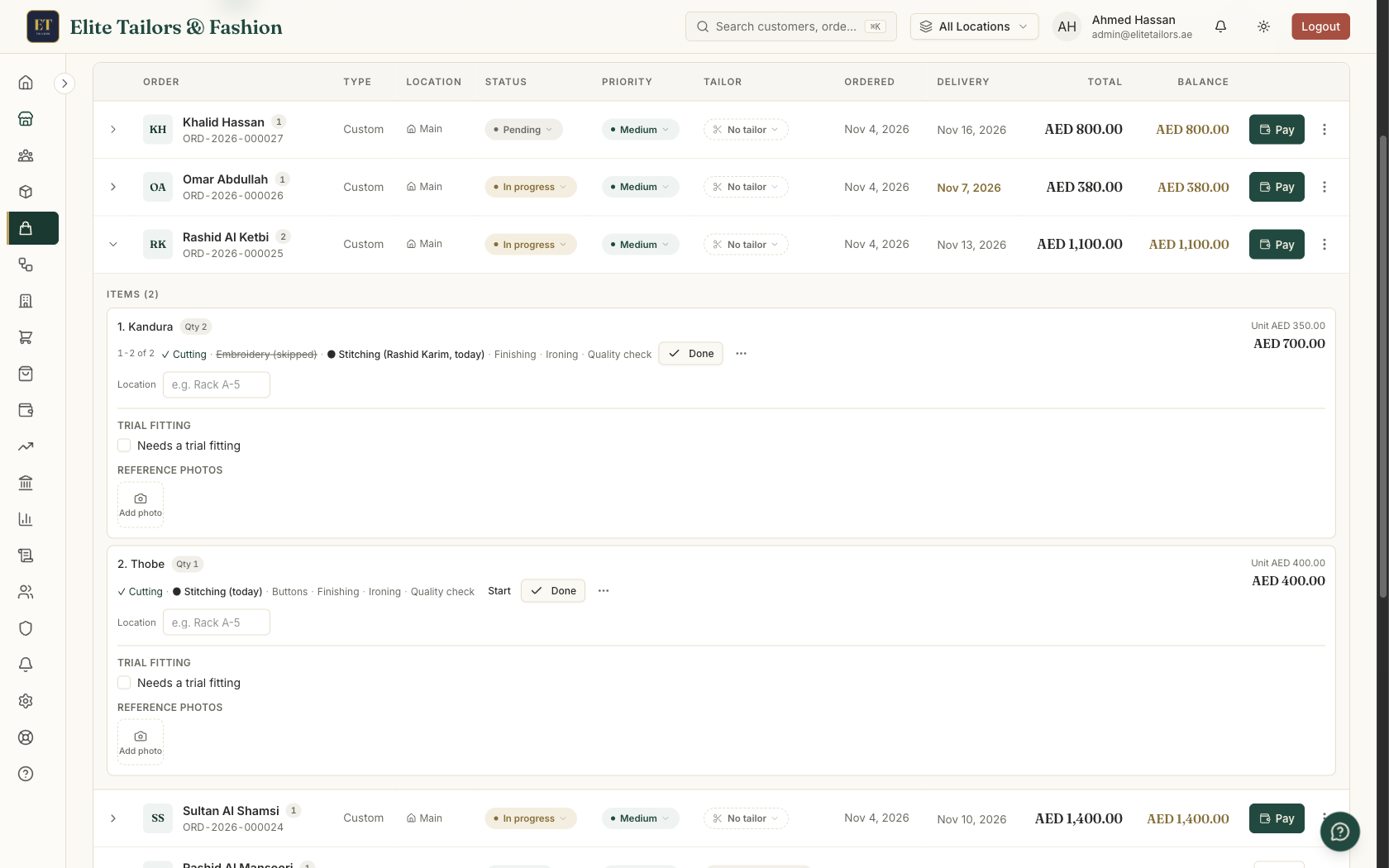
Pieces don't always move together. If only two of the four kanduras get embroidery, split those two onto a card of their own. The cards are labelled 1-2 of 4 and 3-4 of 4, and each moves on its own from then on. A piece that doesn't need a stage can skip it, with a reason. One card can also take an extra step, such as embroidery on one garment only, without changing the route for every other order.
The Workshop board
The Workshop page shows every piece in the making as a card under its stage. Each card has the order number, the garment and its pieces, who has it, how long it has been at that stage and the due date, which turns red and reads Was due once it has passed. Filters narrow the board to one person, one workshop, work due this week or overdue, or the work nobody has been given yet, which is often where a hold-up sits.
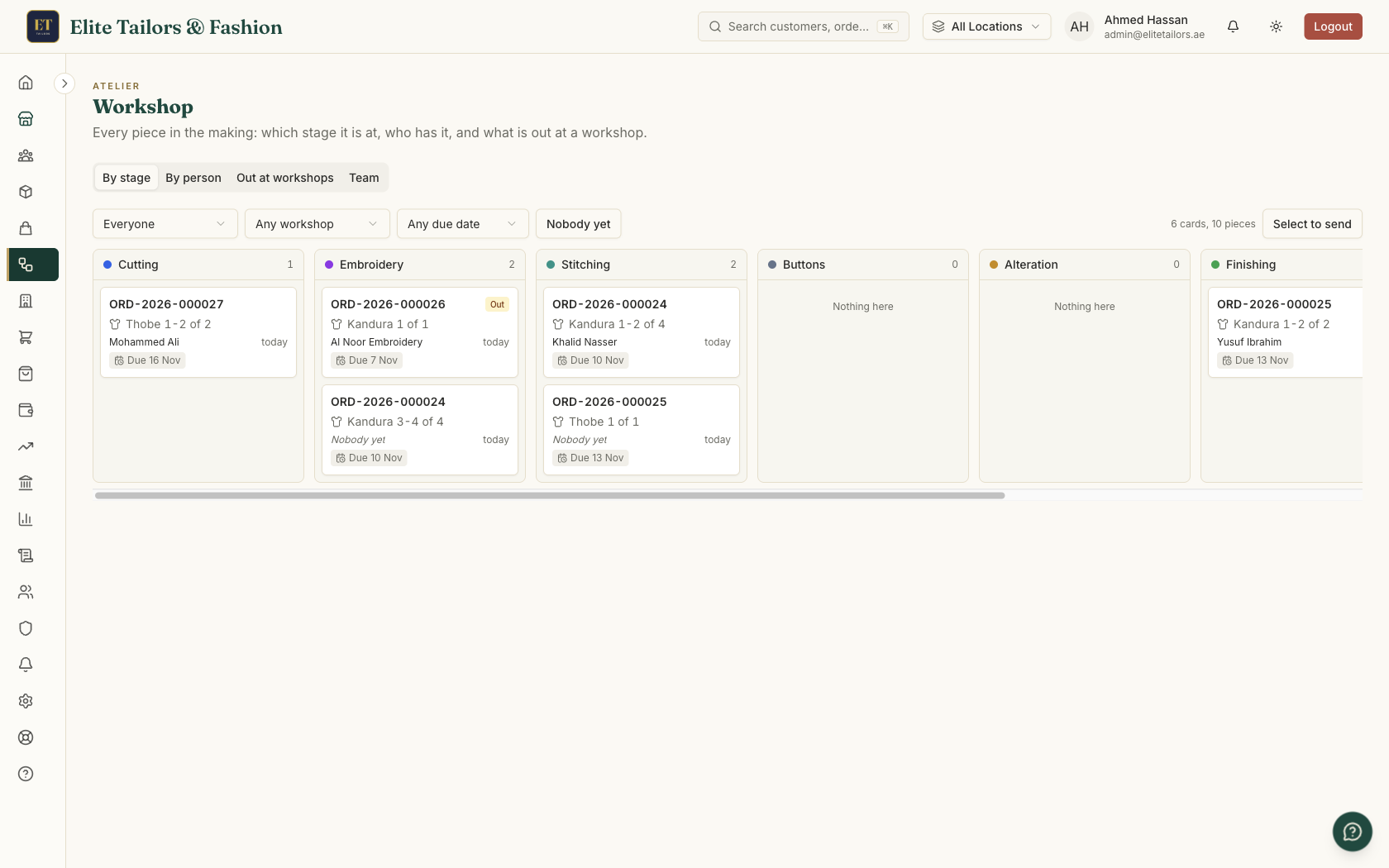
Staff press Start and Done on a step as the work happens, and the board updates by itself for everyone else.
Sending work to an outside workshop
Stone work, machine embroidery or a whole garment stitched outside: some work leaves the shop. Mark the workshop once, on its supplier record, with Does work for us, the stages it takes and the days it usually needs. Then send pieces from the board or from a job card. The date they are due back fills in from those usual days, and each send-out gets a number, like WS-2026-000042.
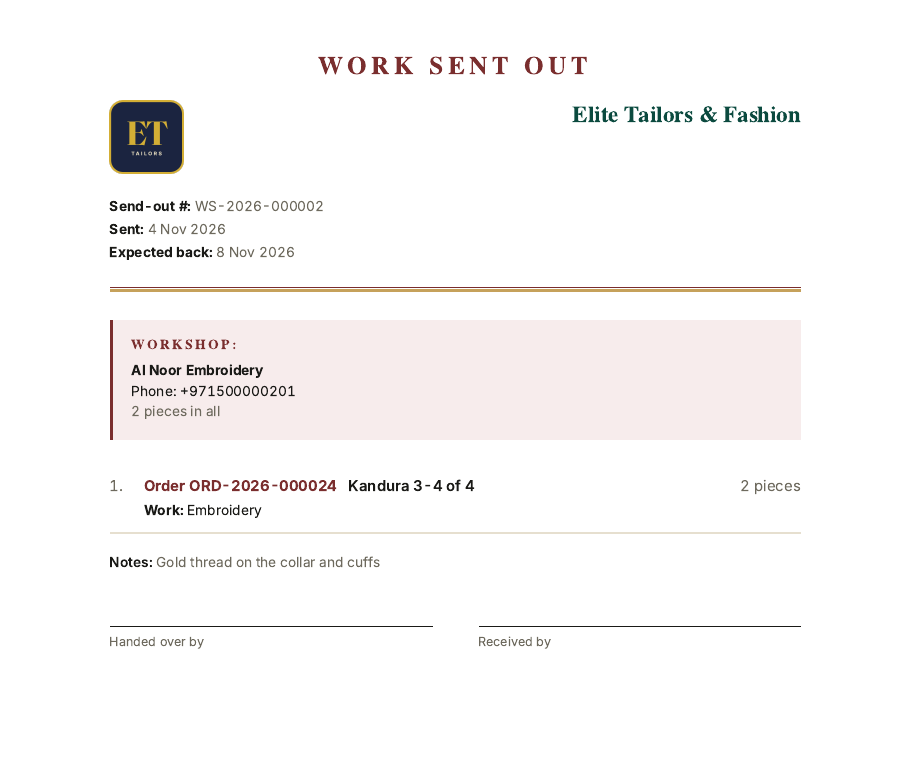
The note lists the order number for each piece, never the customer's name or phone, and no prices. Print it, or send it on WhatsApp. When the pieces come back, receive them under Out at workshops and their card moves on to the next stage. If only some come back, the send-out shows Part back, and one past its date shows Late.
Who is busy and who has room
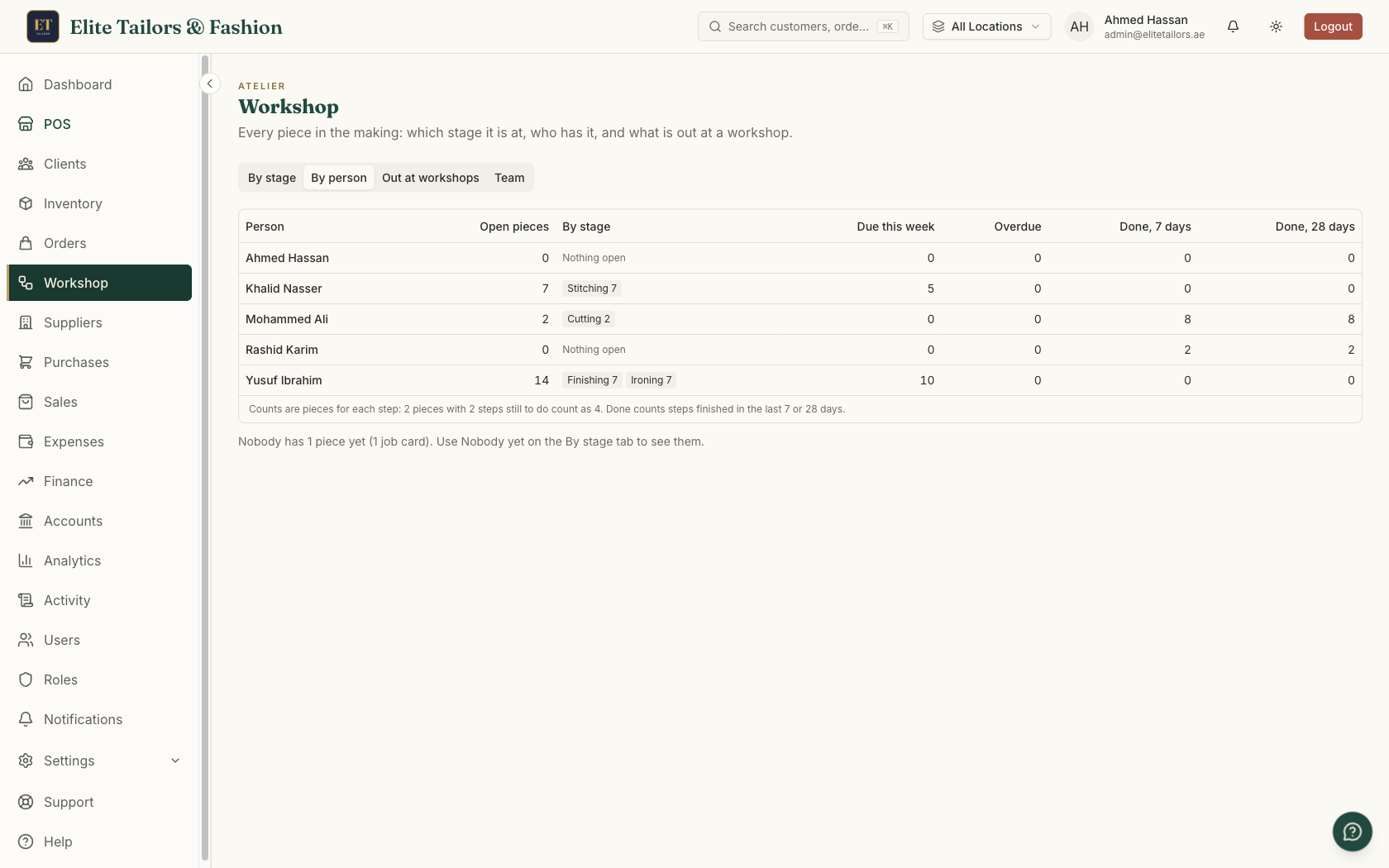
The By person tab has a row for each team member: their open pieces by stage, what is due this week, what is overdue, and the steps they finished in the last 7 and 28 days. Before giving out a stitching job, compare the open pieces of the people who stitch. If you've connected Claude or ChatGPT to your shop, you can also ask it in your own words, such as Who has room for stitching?
Watch Track every garment through your workshop to see all of this on one order for four kanduras, in about three minutes.
Common questions
What is production tracking in a tailoring shop?
It means recording each garment's progress through the workshop, stage by stage, and who has it at each step. In TailorSync each garment line on an order gets a job card that moves through your stages, and the Workshop board shows every card by stage.
Do my tailors need a login to TailorSync?
No. Tailors go on the Team list with a name, a phone number and the stages they do. They don't need to sign in, and they don't count as users on your plan.
Can I track work I send to another workshop?
Yes. Mark the workshop as a supplier that does work for you, then send pieces to it. The note that goes with them shows order numbers but never the customer's name or prices, and when the pieces come back you receive them and the job card moves on.
Which plans include workshop tracking?
Workshop tracking comes with the Expansion and Enterprise plans. The Team list and the Tailor on each order work on every plan.
What happens if I switch workshop tracking off?
The Workshop screens are hidden and every job card is kept as it is. Nothing is deleted, and when you switch it back on you carry on from where you were.
Watch it
- Season 4, Episode 1: Track every garment through your workshop (3:11 video)
- Season 3, Episode 2: Your orders board (1:56 video)
- Season 1, Episode 9: Take a tailoring order (3:36 video)
Keep reading