How a UAE tailoring or retail shop files its FTA VAT return
Filing a UAE VAT return means declaring, for one tax period, the VAT you charged your customers against the VAT you paid on your own purchases and expenses, then paying the Federal Tax Authority whatever is left over (or claiming it back when you paid more than you charged). For a small tailoring or retail shop the hard part is not the sum, it is gathering a whole quarter of counter receipts, tailoring orders, supplier bills and expenses into two clean totals before the deadline. This guide covers how a UAE VAT return works, when it is due, and how TailorSync gives you the figures to enter. One thing up front, in plain words: TailorSync produces the VAT report, it does not file the return for you and it does not connect to the FTA portal.
What a VAT return actually reports
A VAT return is a form you fill in yourself, not a bill that arrives in the post. On it you declare two figures for the period: the VAT you collected from customers, which the FTA calls output tax, and the VAT you paid out to your own suppliers, which it calls input tax. You total each side, subtract input from output, and the answer is either money you owe the FTA or money it owes you. Almost everything a tailoring or retail shop sells or buys carries the UAE standard rate of 5%, so in practice you are adding up a lot of small 5% amounts on each side.
Your tax period: quarterly or monthly
When you register for VAT, the FTA sets you a tax period. For most small businesses that period is a quarter, so you file four times a year. Larger businesses, above a turnover the FTA fixes, file every month instead. Your own period is shown on your VAT registration, and it decides both what a single return covers and the day it falls due. Quarters usually follow the calendar, January to March, April to June, and so on, which makes them easy to line up in your records.
The one subtraction: output tax minus input tax
Everything rests on a single subtraction. Output tax is the VAT you added to what you sold across the quarter: your counter receipts, your bespoke tailoring orders, and any wholesale invoices. Input tax is the VAT you were charged on what you bought to run the shop: fabric and trims from suppliers, plus expenses like rent and utilities that came with VAT on them. Add up each side for the period. Take the input tax away from the output tax. What remains is your net VAT for that return.
You can only reclaim input tax on genuine business purchases backed by a valid tax invoice, so keep the supplier invoices that show a TRN and a VAT amount. A few costs are blocked from recovery, such as personal use and most entertainment, so not every dirham of VAT you pay comes back.
Do you pay, or get money back?
If your output tax comes to more than your input tax, and for a shop that sells more than it buys it usually does, the difference is your net VAT payable and you pay it to the FTA with the return. If input tax comes to more, which can happen in a quarter where you bought a lot of stock and sold little, the difference is refundable and you can claim it or carry it forward. Either way the return reports the same subtraction. The sign just tells you which direction the money moves.
The deadline: 28 days after the period ends
A UAE VAT return, and the payment that goes with it, is due by the 28th day of the month after your tax period closes. A quarter that ends on 31 March has to be filed and paid by 28 April. Miss that date and the FTA adds a late filing penalty, then a further penalty on the tax paid late, so this is a deadline worth putting in the calendar. The filing itself happens on the FTA online portal, where you sign in, enter your figures on the VAT return form, submit it, and pay through the portal.
Keep every record for five years
UAE law asks you to keep your VAT records for at least five years: the tax invoices you issued, the credit notes, the supplier invoices behind your input tax, and the working that shows how each return was reached. If the FTA opens an audit, these are exactly what it asks to see. A shoebox of fading thermal receipts is a poor answer, which is one more reason to keep the figures somewhere they stay legible and searchable.
Where TailorSync fits, and where it does not
Here is the honest limit. TailorSync does not file your return, and it has no link to the FTA portal. What it does is the part that eats your evening: it works out the two totals you need. Its VAT report reads every sale, tailoring order and POS receipt for your output tax, and every purchase and expense for your input tax, then shows the net VAT payable or refundable for the period. You still sign in to the FTA portal and type the figures in yourself. TailorSync hands you the numbers; the filing stays yours.
Pulling the figures for your return
- 1
Open Finance and choose the VAT tab, which lays out VAT collected against VAT paid.
- 2
Set the period to your filing quarter. The Q1 to Q4 presets match the calendar quarters, so they line up with a standard VAT return.
- 3
Read VAT collected (output tax): the VAT from your sales, from your tailoring orders, and from POS counter takings, totalled for you.
- 4
Read VAT paid (input tax): the VAT on your supplier purchases and on your approved expenses.
- 5
Read the bottom line, your net VAT payable or refundable, which is simply collected minus paid.
- 6
Open the Collected and Paid detail if you want the line-by-line working behind each total, ready for your accountant or an FTA query.
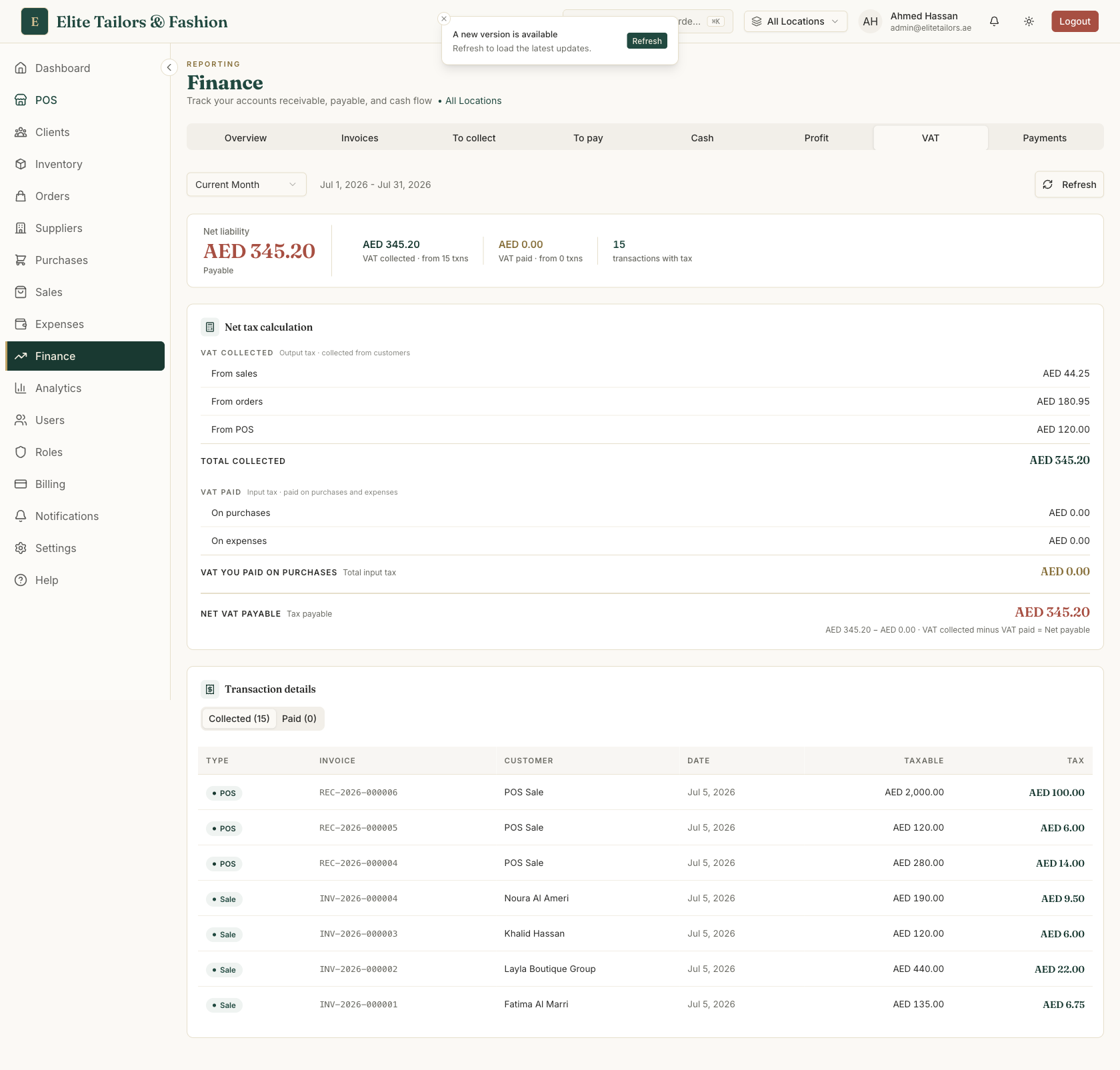
One quirk to know. TailorSync counts the VAT on a tailoring order as the customer pays it, so a half-paid order shows only half its VAT until the balance clears, while sales and POS count their full VAT on the invoice. It matches what you have actually collected, but it means a quarter with big unpaid orders can read lower than you expect. Check your part-paid orders before you file.
Line the report up with your exact VAT quarter using the Q1 to Q4 presets, then keep that period as your working paper for the return. The figures on screen are only as good as the records behind them, so log your sales, purchases and expenses as they happen and the quarter totals itself.
Common questions
How often does a UAE business file a VAT return?
Most small businesses file quarterly, four returns a year, while larger businesses above a turnover set by the FTA file monthly. Your tax period is fixed by the FTA when you register, and each return, with its payment, is due by the 28th day of the month after the period ends.
What is the difference between output tax and input tax?
Output tax is the VAT you charge your customers on what you sell. Input tax is the VAT you are charged by suppliers on what you buy for the business. Your VAT return reports both, and you pay the FTA the amount by which your output tax exceeds your input tax. If input tax is the larger of the two, the difference is refundable to you.
When is the UAE VAT return deadline?
A VAT return and its payment are due by the 28th day of the month following the end of your tax period. For a quarter ending 31 March, that means 28 April. Filing or paying late brings FTA penalties, so it is worth setting a reminder a week ahead.
Does TailorSync file my VAT return for me?
No. TailorSync produces the VAT report, the output tax and input tax totals and the net figure for your chosen period, but it does not file the return and it does not connect to the FTA portal. You still sign in to the FTA portal and enter the figures yourself. TailorSync gives you the numbers to type in and the transaction detail behind them.
How long do I have to keep VAT records in the UAE?
At least five years. That covers the tax invoices you issued, your credit notes, the supplier invoices behind your input tax, and the working behind each return. The FTA can ask to see them in an audit, so keep them somewhere durable rather than on thermal receipts that fade.
Keep reading