Managing fabric and materials stock for a tailoring shop
The workable way to manage fabric stock in a tailoring shop is to count each material in the unit you buy it in, cloth by the metre and trims like buttons, zips and thread by the piece, and to put a cost on every item so you always know what the shelves are worth. Get that right and two questions answer themselves: what is running low, and how much money is sitting on the racks. This guide covers how a busy tailoring shop keeps its fabric and materials stock straight, using TailorSync as the worked example.
Count fabric by the metre, trims by the piece
A tailoring shop does not hold stock the way a clothing shop does. You buy cloth on a roll and sell it by the metre off that roll, while buttons, zips, hooks and reels of thread come and go by the piece or the cone. Good records start by matching the count to that. In TailorSync every item carries a unit, with Meter, Piece, Roll and Cone among the choices, and it defaults to Meter because most of what a tailor counts is cloth. Count each item in the unit you actually cut or fit from, so 40 metres of nida on the shelf reads as 40 m and a box of buttons reads as 500 pieces. Every item also holds a name, a SKU code that has to be unique in your shop, a category such as Fabric or Accessory, and the cost you paid for it.
Products carry a stock count, services do not
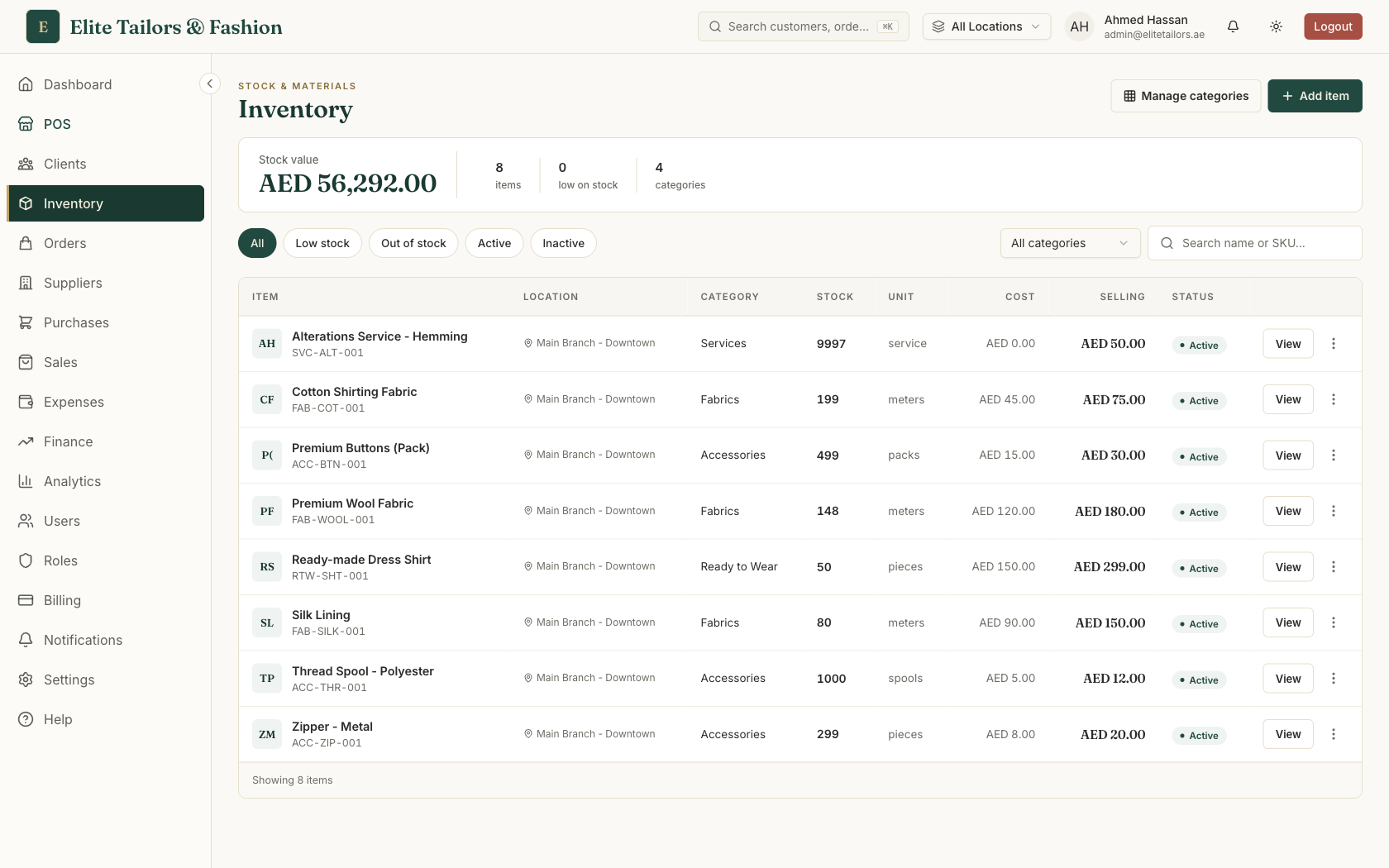
Not everything a tailor sells sits on a shelf. Cloth, buttons and thread are stock you can count. Stitching an abaya or a jallabiya, or taking in a waist, is work, and there is nothing to count. TailorSync draws that line by making every item either a product or a service. A product is physical stock: it holds a quantity, adds to your stock value, and warns you when it runs low. A service, such as abaya stitching or an alteration, still carries a cost and a sell price, so the margin on your labour is worked out and kept, but it has no quantity at all. Sell a service at the counter and nothing moves in your stock: it never shows as low and it never counts toward your stock value. That is what lets one list hold your black nida by the metre and your stitching charges together, without the labour ever pretending to be stock.
An item can move between product and service later. So if you set up a stitching charge as a product by mistake and watched it flag as 'low', switch it to a service and the quantity drops away. You can also filter the list by type when you want to see only what you physically hold.
Set a reorder level so you don't run out mid-order
The reason you count cloth at all is to reorder before a customer's kandura is held up waiting for it. Give each product a reorder level, the figure at which it counts as low, and TailorSync flags it the moment stock falls to that number or below. For a fast-moving nida you might set the level at 20 m; for a specialty lace you rarely cut, two or three metres is plenty. Beside it sits a reorder quantity, a note of how much to buy back when you do reorder. It is a reminder only and places no order with your supplier. The inventory screen keeps a running count of how many items are low on stock, and a Low stock filter pulls up just those, each row wearing a gold Low badge, with a red Out badge on anything that has reached zero. Services, having no stock, never turn up here.
Know what your shelves are worth
Sooner or later every owner wants to know how much money is tied up in stock. TailorSync puts the answer across the top of the inventory screen as a single stock value: every active item priced at cost (quantity times cost price) and added up. So 40 m of abaya crepe at AED 22 a metre counts as AED 880, and the total is the sum of every item on that same basis. It is valued at cost, not at what you sell for, because cost is what the stock is really worth to you. Open any one item and you see both sides together: its value at cost, the revenue it would bring at your selling price, and the margin between them. Only active items feed the total, so an item you mark inactive drops out of the stock value while keeping all of its history.
Put a cost on every item, even the ones you are tempted to leave blank. Cost is what feeds both your stock value and the margin on each sale, so an item saved with a zero cost quietly understates what your shelves are worth and flatters your margin.
Common questions
How do tailoring shops keep track of fabric stock?
They hold each material as an item counted in the unit they buy and cut it in: cloth by the metre, and buttons, zips and thread by the piece or cone. Each item carries a cost and a reorder level, so the shop can see what is running low and what the stock is worth. In TailorSync that same list sells through the POS, and selling a fabric at the counter is what lowers its count automatically.
What is the difference between a product and a service in tailoring inventory?
A product is physical stock you count, like cloth, buttons or thread. It has a quantity, feeds your stock value and warns you when it runs low. A service is work you sell but never stock, like abaya stitching or an alteration. A service carries a cost and a selling price so its margin is still worked out, but it has no quantity and stays out of your stock value.
How do low-stock alerts work for fabric?
You give each product a reorder level, the figure at which you want to be warned. When stock falls to that level or below, the item is flagged as low with a gold badge, and the inventory screen keeps a running count of low items you can filter to. A reorder quantity sits beside it as a reminder of how much to buy back, though it does not place any order with your supplier.
How is fabric stock value calculated?
Stock value is every active item priced at cost, quantity times cost price, added together. So 40 metres of abaya crepe at AED 22 a metre is AED 880, and the figure at the top of the inventory screen sums every item on that basis. It is valued at cost rather than at your selling price, and anything you mark inactive drops out of the total.
Keep reading