Abaya customisation orders: recording style, fabric and embroidery for every customer
Updated · By the TailorSync team, built by a UAE tailoring family
An abaya customisation order is only as good as what gets written down at the counter: the design the customer started from, the fabric and who supplies it, the colour, the sleeve and neckline style, any embroidery or stonework, and the measurements. When all of that sits on the order, the tailor works from the record instead of from memory. This guide shows how an abaya shop records each choice in TailorSync and hands it to the workshop. TailorSync keeps the order. It doesn't draw or design abayas, so the design itself still comes from your rail, a sketch or the customer's reference picture.
 Watch it · 3:36Take a tailoring orderSeason 1, Episode 9
What to record on a customised abaya
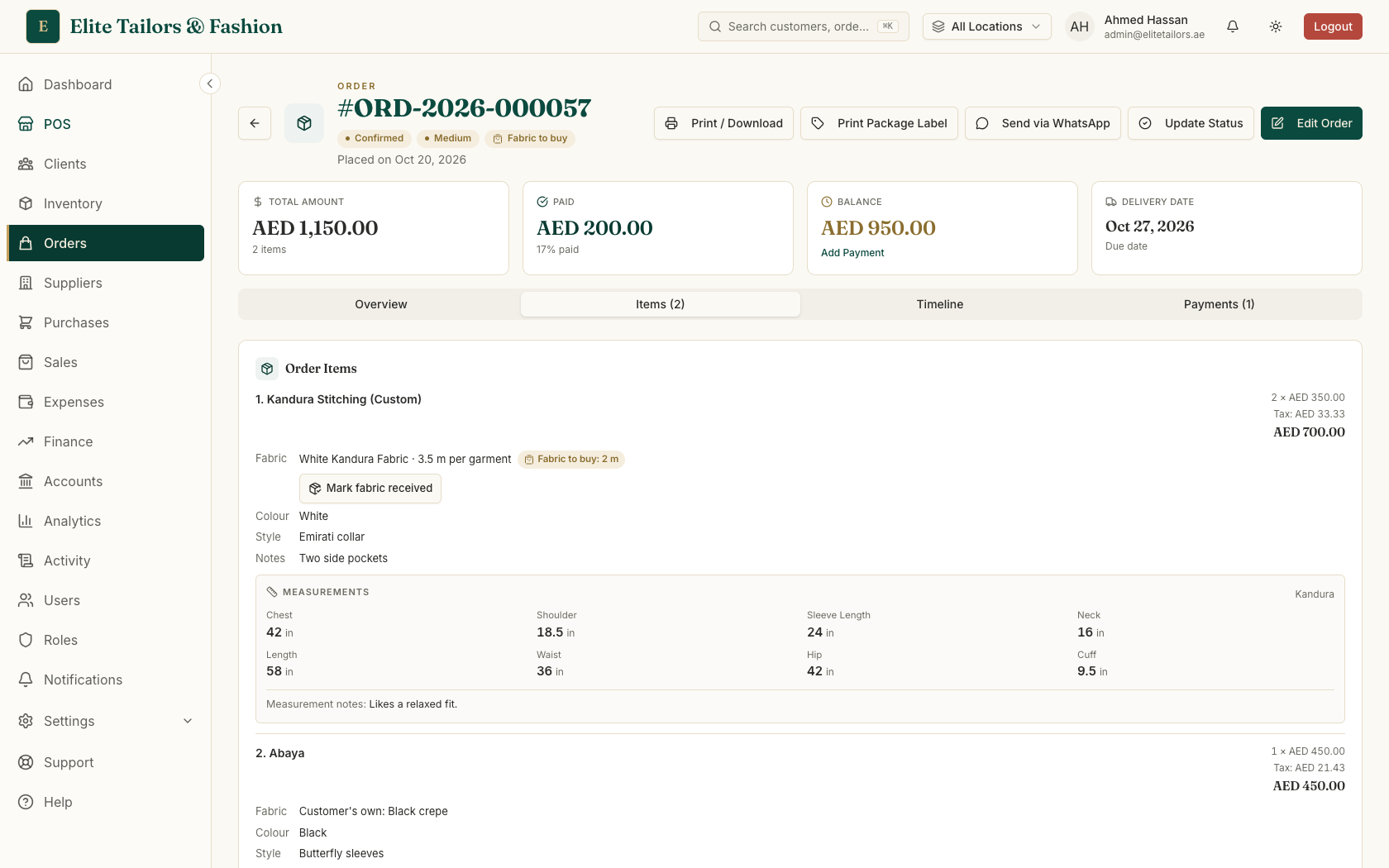
Every customised abaya comes down to the same handful of decisions. Miss one and the shop ends up with the right cut in the wrong crepe, or sleeves the customer never asked for. In TailorSync each decision has a place on the garment's line:
- 1
The design. Start from an abaya you already sell and make it to measure, or add a new piece by name.
- 2
Fabric. Shop fabric from your stock with the metres per garment, or the customer's own cloth with a short description, such as "black crepe".
- 3
Colour and style. The colour, and a short style note such as "Butterfly sleeves".
- 4
Embroidery and hand-work. Where it goes, the thread colour and any stones or beads, written in the notes for the tailor. If you charge for it separately, add it to the same order as its own service line.
- 5
Measurements. A saved measurement set, a new set taken now, or Later if you will measure at the fitting or work from a sample abaya.
- 6
Quantity and price. The price is per garment, so three matching abayas for a wedding party add up on their own.
Taking the order at the counter
Most customised abayas are taken at the counter, with the customer in front of you and the fabric on the table.
- 1
Attach the customer first, with Search customer or Add new, so their saved measurements are ready to pick.
- 2
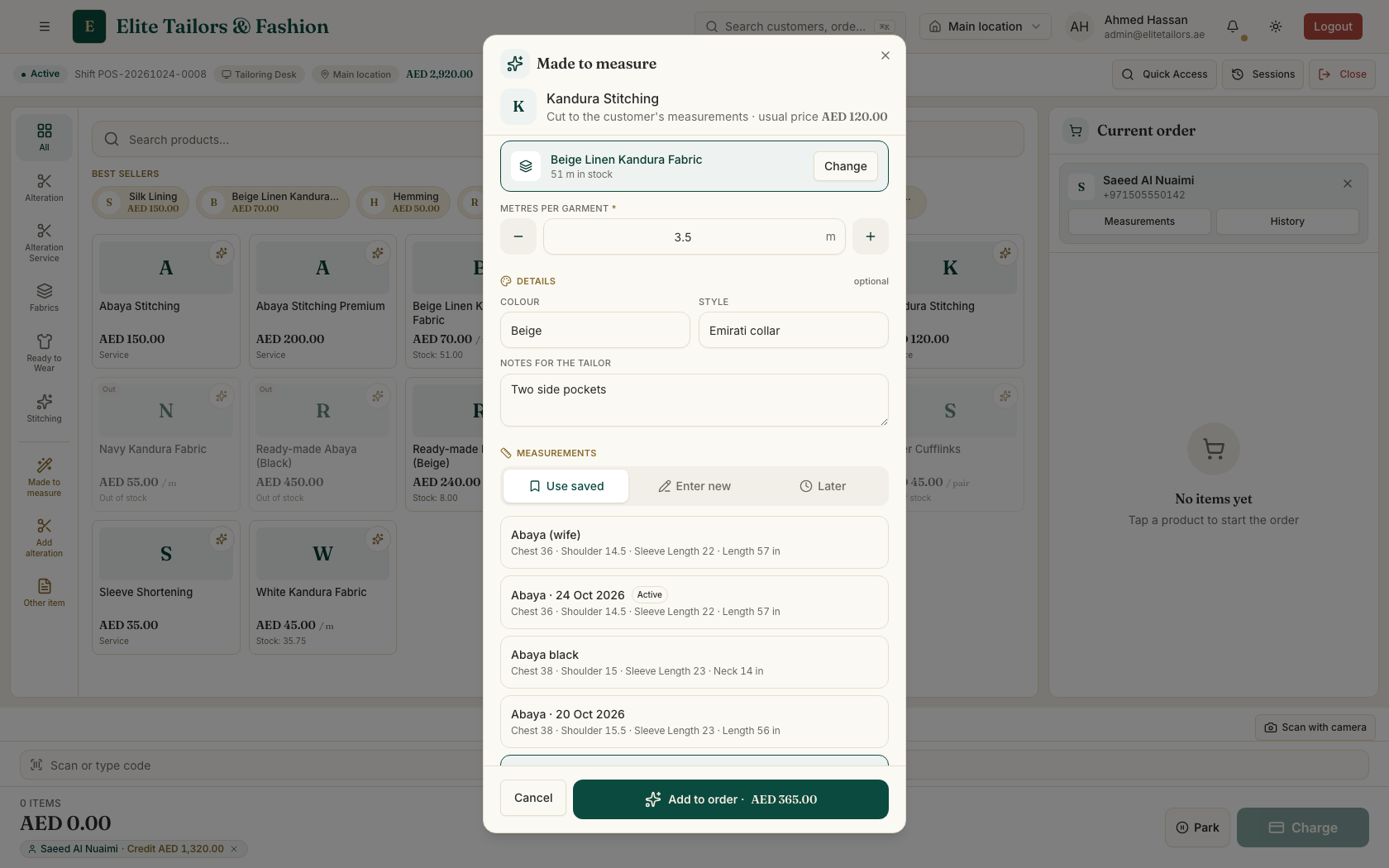
If they want an abaya you stock made to their size, tap the small sparkle in the corner of its tile. For a new piece, tap Made to measure and type the item name, such as "Abaya".
- 3
Under Fabric, choose Shop fabric and set the metres per garment, or Customer's own and describe it.
- 4
Fill in the Colour, Style and Notes for the tailor. The embroidery details go in the notes.
- 5
Under Measurements, pick a saved set with Use saved, tap Enter new for figures you take now, or choose Later.
- 6
Set the quantity and the price per garment, then take the order with its delivery date and the deposit.
Write embroidery notes in the same order every time: placement first, then thread colour, then stones or beads. For example, "Sleeve cuffs and front edge, gold thread, small crystals". Your embroiderer learns where to look, and nothing gets left out.
Fabric from your shelf, or the customer's own
With shop fabric, TailorSync knows how much is on the shelf. If there isn't enough for the order, the form tells you, for example "Only 6 m in stock: the rest will be marked fabric to buy", and you can still take the order. What's on the shelf is set aside for it, and the rest shows on the order as Fabric to buy until you mark it received. With the customer's own cloth, nothing comes out of your stock, and the description travels with the garment to the workshop.
Measurements for each kind of abaya
One customer may want a fitted abaya for a wedding and a looser one for every day. Save each as its own named measurement set, such as "Wedding abaya", with a note for the tailor. When you make a garment to measure, a set named after it, such as "Abaya", is picked first, and you can choose another. The standard list covers the full length, chest, shoulder, sleeve and the rest, and Add a measurement takes anything extra, like sleeve width. The measurements guide goes into more detail.
Hand the workshop everything except the prices
Print the workshop copy for the tailor. It always prints on A4 and shows the order number with a barcode, the customer, the delivery date, each garment's fabric (with any fabric still to buy), colour, style and measurements, and your special instructions. It leaves out the prices, payments and VAT, so you can hand it over as it is. The customer gets the order form, with the same details plus the prices, the deposit and the balance.
In the workshop, each abaya moves through its own stages, from cutting and stitching to finishing and ready, and you can note where it hangs, like Rack A-5. When the customer comes in for a fitting, set the order to Trial, and to Alteration if it goes back on the table for changes. The order tracking guide follows the whole route to pickup.
Common questions
Is TailorSync abaya design software?
No. TailorSync doesn't draw or design abayas. It records the customisation order: the design the customer chose from your rail or described, the fabric, colour, style, embroidery notes and measurements. Then it tracks the abaya through the workshop to pickup. Shops that sketch their designs keep doing that on paper or in a drawing app, and write the details on the order.
How do I record embroidery on a custom abaya order?
Write it in the Notes for the tailor on the abaya's line: where it goes, the thread colour and any stones or beads. The notes print on the workshop copy. If you charge for embroidery separately, set it up once as a service item and add it to the same order with this job's price.
Can a customer customise an abaya from my rail?
Yes. Tap the sparkle on the abaya's tile at the counter and Made to measure opens with that product and its usual price. Choose the fabric, colour, style and measurements, set the price per garment, and the abaya goes onto the order as a custom line.
What if the customer brings their own fabric?
Choose Customer's own under Fabric and describe it, for example black crepe. Nothing is taken from your stock, and the description prints with the garment on the workshop copy.
Can I keep different measurements for different abayas?
Yes. A customer can have several named measurement sets, such as Abaya and Wedding abaya, each with its own note for the tailor. When you make a garment to measure, the set named after it is picked first, and you can choose another.
Watch it
- Season 1, Episode 9: Take a tailoring order (3:36 video)
- Season 1, Episode 5: Add a customer and take measurements (2:58 video)
- Season 1, Episode 11: From workshop to pickup (3:10 video)
Keep reading